

Data Analysis Tools 2026
Data analysis tools are software applications and programming environments used to collect, clean, organize, analyze, and visualize data in order to extract meaningful insights. In 2026, these tools span a wide spectrum — from familiar spreadsheet programs like Microsoft Excel and Google Sheets to advanced AI-powered analytics platforms that process natural language queries. The global data analytics market, valued at approximately $69 billion in 2024 according to Grand View Research, is projected to grow at a compound annual growth rate (CAGR) near 29% through 2030, reflecting the accelerating demand for data-driven decision-making across every industry. This guide evaluates more than 25 data analysis tools across six distinct categories, providing a factual, vendor-neutral overview to help analysts, students, business professionals, and technical teams identify which tools align with their skill level, use case, and organizational needs.
What This Guide Covers:
- 25+ tools organized into six functional categories (spreadsheets, BI platforms, programming languages, statistical software, cloud data engines, and AI-powered analytics)
- Factual profiles including capabilities, deployment models, pricing approaches, and documented limitations
- Market context with current adoption data and industry trends
- A structured decision framework for selecting the right tool based on skill level, team size, data volume, and budget
- 12 frequently asked questions with standalone answers
Key Finding: The data analysis tools landscape in 2026 is defined by convergence — traditional BI platforms are adding AI-powered natural language features, programming languages are gaining low-code interfaces, and entirely new AI-native tools are emerging that let users analyze data through conversation rather than code. According to Gartner’s 2025 data and analytics predictions, 90% of current analytics content consumers are expected to become content creators by 2026, enabled by these AI augmentation capabilities.
How We Evaluated These Data Analysis Tools
Scope
This guide covers general-purpose data analysis tools that are commercially available or open-source as of February 2026. It includes tools used for data cleaning, transformation, statistical analysis, visualization, querying, and AI-augmented insight generation. It does not cover domain-specific tools (such as genomics analysis software or geospatial-only platforms), data engineering-only infrastructure (such as Apache Kafka or Airflow), or customer analytics platforms focused exclusively on web behavior tracking.
Target Audience
This guide serves a broad audience reflecting the informational nature of this subject. Primary readers include data analysts, business analysts, data science students, and professionals exploring data careers. Secondary readers include IT managers evaluating tools for their teams, small business owners seeking accessible analytics capabilities, and marketers who work with campaign and customer data. The vocabulary, examples, and level of technical detail are calibrated to be accessible to someone beginning their analytics journey while remaining substantive for experienced practitioners.
Evaluation Framework
Each tool was assessed across six dimensions:
- Primary function — What category of data analysis task the tool is designed for
- Technical accessibility — Whether the tool requires coding skills, and the learning curve involved
- Deployment model — How the tool is accessed (cloud, desktop, browser, server-based)
- Integration ecosystem — Which data sources and complementary tools it connects with
- Pricing approach — The general pricing model (free, freemium, subscription, enterprise quote-based)
- Documented limitations — Known constraints reported in vendor documentation, analyst reports, or independent reviews
Data Sources
Information was compiled from vendor documentation, Gartner Magic Quadrant reports (2025 edition for Analytics and BI Platforms), Forrester Wave evaluations, independent benchmarks, Stack Overflow Developer Surveys, academic research from institutions including Stanford HAI and MIT, and market sizing data from Grand View Research, Fortune Business Insights, and Precedence Research. Adoption and usage statistics were drawn from publicly available reports by these organizations.
What This Guide Does Not Cover
This guide does not include performance benchmarks, as results vary significantly by dataset and hardware configuration. It does not provide implementation guides or tutorials. It does not cover enterprise pricing in detail, as most enterprise plans are quote-based and vary by organization. It does not assess customer support quality, which is subjective and dependent on contract terms.
Independence Statement
This analysis was conducted independently by Axis Intelligence. No commercial relationship exists with any vendor mentioned. No compensation was received for inclusion, placement, or characterization of any tool. All evaluations are based on publicly available information, official vendor documentation, and independent technical assessments.
The State of Data Analysis Tools in 2026
Market Overview
Data analysis tools form a critical component of the broader data analytics software market. The global data analytics market was valued at approximately $69.5 billion in 2024 and is projected to reach $302 billion by 2030, according to Grand View Research. Fortune Business Insights estimates the 2025 market value at $82.2 billion, projecting growth to nearly $496 billion by 2034 at a CAGR of 21.5%. While these figures encompass the full analytics ecosystem (including infrastructure, services, and consulting), they reflect the scale of investment organizations are directing toward data-driven capabilities.
North America accounted for roughly 32% of the global market share in 2025, driven by early adoption of cloud-based analytics and the concentration of major vendors — Microsoft, Salesforce (Tableau), Google (Looker), Oracle, and Qlik — headquartered in the region. The Asia-Pacific region represents the fastest-growing segment, with increasing adoption of analytics tools among enterprises undergoing digital transformation.
What Drives Adoption
Several forces are accelerating the adoption of data analysis tools across organizations of all sizes. The volume of data generated globally continues to grow — IDC projected global data creation to reach 180 zettabytes by 2025, making structured analysis not merely valuable but operationally necessary. Simultaneously, the talent pool is expanding: Google’s Data Analytics Certificate program alone has enrolled millions of learners, and platforms like Coursera, edX, and DataCamp report year-over-year increases in analytics course enrollment.
Regulatory requirements also play a role. Financial reporting standards (SOX, IFRS), healthcare regulations (HIPAA), and data privacy frameworks (GDPR, CCPA) require organizations to analyze and report on data with increasing rigor, driving demand for tools that support auditability and compliance.
How AI Is Reshaping the Landscape in 2026
The most significant shift in data analysis tools during 2025-2026 is the integration of generative AI and large language model (LLM) capabilities directly into established platforms. Microsoft embedded Copilot into Power BI, Salesforce introduced Tableau AI features, Google added Gemini capabilities into Looker, and ThoughtSpot launched its Spotter agentic analytics interface — all enabling users to interact with data through natural language rather than formulas, code, or complex query builders.
According to Gartner’s 2025 predictions for data and analytics, 90% of analytics content consumers are expected to become content creators enabled by AI by 2026. This marks a fundamental democratization: users who previously could only consume dashboards can now build their own analyses by asking questions in plain English. The analyst firm also predicted that by 2026, 75% of businesses will use generative AI to create synthetic data for analytics purposes.
However, this AI integration comes with documented caveats. A widely cited example from 2025 involved a company that attempted to replace a human analyst entirely with an AI tool, only to discover the AI’s dashboard contained a strategic error that went undetected until significant damage had occurred. This underscores the emerging industry consensus: AI augments data analysts rather than replacing them.
Key Challenges Users Face
Despite market growth and increased accessibility, users of data analysis tools encounter persistent challenges. Data quality remains the primary barrier — analysts frequently report spending 60-80% of their time on data cleaning and preparation rather than actual analysis. Integration complexity is another recurring issue, particularly in organizations using multiple tools that do not natively communicate with one another. Tool sprawl (the proliferation of overlapping analytics tools within a single organization) creates inconsistency in metrics and definitions. The learning curve for advanced tools (particularly programming languages like Python and R) continues to limit adoption among non-technical professionals, though AI-powered features are beginning to reduce this barrier.
How Data Analysis Tools Are Organized
Data analysis tools serve different functions and require different skill sets. Understanding the categories helps clarify which tools are appropriate for a given use case. The following six-category taxonomy organizes the 25+ tools covered in this guide.
Category 1: Spreadsheet Tools
Spreadsheet tools are grid-based applications that allow users to organize data in rows and columns, perform calculations using formulas, and create basic visualizations such as charts and pivot tables. They require no coding skills and are the most widely adopted category of data analysis tool globally. Spreadsheets are typically used for datasets under 100,000 rows and serve as the entry point for most professionals beginning to work with data.
Typically used by: Business professionals, accountants, students, small business owners, marketers
Price range: Free (Google Sheets) to $6.99–$22/month (Microsoft 365)
Category 2: Business Intelligence (BI) Platforms
Business intelligence platforms are software applications designed to transform raw data into interactive visual dashboards, reports, and analytical summaries. They typically connect to multiple data sources, offer drag-and-drop interfaces for building visualizations, and support sharing insights across teams and organizations. The 2025 Gartner Magic Quadrant for Analytics and BI Platforms identified Leaders in this category including Microsoft (Power BI), Salesforce (Tableau), Google (Looker), Qlik, Oracle Analytics, and ThoughtSpot.
Typically used by: Business analysts, data analysts, executive teams, IT departments
Price range: Free tiers available (Power BI Desktop, Looker Studio) to $35-$75/user/month for enterprise features
Category 3: Programming Languages and Environments
Programming languages for data analysis are text-based coding tools that offer maximum flexibility and control over data manipulation, statistical computation, and visualization. They require coding proficiency but provide capabilities that exceed what GUI-based tools can deliver, particularly for custom analysis, automation, and machine learning. Python and R are the two dominant languages in this space, while SQL serves as the foundational language for querying structured databases.
Typically used by: Data scientists, data engineers, academic researchers, developers
Price range: Free and open-source (Python, R, SQL, Jupyter)
Category 4: Statistical and Specialized Analytics Software
Statistical analytics software provides purpose-built environments for advanced statistical modeling, predictive analytics, and data mining. These tools are often used in regulated industries (healthcare, finance, pharmaceuticals) where audit trails, validation, and specialized statistical tests are requirements. Some offer visual workflow builders that allow complex analyses without traditional coding.
Typically used by: Statisticians, researchers, pharmaceutical analysts, financial analysts, quality assurance teams
Price range: Free (KNIME) to $8,000-$30,000+/year (SAS, SPSS enterprise licenses)
Category 5: Cloud Data Platforms and Big Data Engines
Cloud data platforms and big data engines are infrastructure-level tools designed to store, process, and analyze datasets that exceed the capacity of desktop applications — often spanning millions or billions of rows. They operate on distributed computing architectures that spread processing across multiple servers for speed and scalability. These tools are typically part of a broader data stack rather than standalone analysis solutions.
Typically used by: Data engineers, platform teams, organizations with large-scale data needs
Price range: Usage-based pricing (pay-per-query or compute hour), typically $0 for small workloads to enterprise-scale budgets
Category 6: AI-Powered Analytics Tools
AI-powered analytics tools use large language models (LLMs), machine learning, and natural language processing to enable data analysis through conversational interfaces. Instead of writing code or building queries manually, users describe what they want to know in plain language, and the tool generates analyses, visualizations, and insights. This category emerged rapidly during 2023-2025 and is still evolving.
Typically used by: Business users without coding skills, analysts seeking faster exploration, teams wanting to democratize data access
Price range: Free tiers available to $20-$50/user/month for premium features
Data Analysis Tools Comparison: Key Features at a Glance
| Tool | Category | Primary Function | Coding Required | Deployment | Pricing Model | Notable Limitation |
|---|---|---|---|---|---|---|
| Microsoft Excel | Spreadsheet | Data organization, calculations, basic visualization | No | Desktop, Web, Mobile | Subscription (Microsoft 365) | Performance degrades significantly above ~100K rows |
| Google Sheets | Spreadsheet | Collaborative data organization and analysis | No | Browser-based (cloud) | Free (paid Workspace tiers available) | 10 million cell limit per spreadsheet; slower with large datasets |
| Microsoft Power BI | BI Platform | Interactive dashboards and business reporting | No (DAX for advanced) | Desktop + Cloud | Freemium ($0 Desktop / $14/user/mo Pro) | Desktop app is Windows-only; advanced features require premium licensing |
| Tableau | BI Platform | Data visualization and interactive exploration | No | Desktop + Cloud | Subscription ($15-$75/user/mo) | Steep learning curve for complex data sources; Public version makes data public |
| Qlik Sense | BI Platform | Associative data exploration | No | Cloud, On-premise | Subscription (quote-based) | Smaller third-party ecosystem than Power BI or Tableau |
| Looker | BI Platform | Governed analytics with semantic modeling | LookML (SQL-based) | Cloud (Google Cloud) | Quote-based enterprise pricing | Requires LookML modeling; not suitable for ad-hoc analysis without setup |
| Looker Studio | BI Platform | Free report building and dashboarding | No | Browser-based (cloud) | Free (Pro version available) | Limited data transformation capabilities; slower with large datasets |
| Zoho Analytics | BI Platform | Self-service BI for small-to-mid-size businesses | No | Cloud | Freemium (paid plans from $30/mo) | Less suitable for very large-scale enterprise deployments |
| Domo | BI Platform | Cloud-native BI with 1,000+ data connectors | No | Cloud | Quote-based | Primarily US/Europe market presence |
| Python | Programming | General-purpose analysis, ML, automation | Yes | Local, Cloud, Notebooks | Free (open-source) | Requires coding proficiency; no built-in GUI |
| R | Programming | Statistical computing and visualization | Yes | Local, Cloud, Notebooks | Free (open-source) | Steeper learning curve than Python; less general-purpose versatility |
| SQL | Programming | Database querying and data retrieval | Yes | Any database system | Free (open-source variants) | Query-only — does not provide visualization or statistical modeling natively |
| Jupyter Notebooks | Programming Environment | Interactive coding with documentation | Yes (Python/R) | Local, Cloud (JupyterHub) | Free (open-source) | Not a production environment; limited collaboration features in base version |
| DuckDB | Programming | In-process analytical database | Yes (SQL) | Embedded (local) | Free (open-source) | Single-machine only; not designed for distributed workloads |
| SAS | Statistical | Enterprise statistical analysis and modeling | SAS language | On-premise, Cloud (SAS Viya) | Quote-based enterprise licensing | High cost; proprietary language with a smaller talent pool than Python/R |
| IBM SPSS | Statistical | Statistical analysis with GUI | No (point-and-click) | Desktop | Subscription ($99/mo+) | Limited machine learning capabilities compared to Python-based workflows |
| Stata | Statistical | Econometrics and biostatistics | Stata commands | Desktop | Perpetual license ($295-$695+) | Niche user base; less versatile outside academic research |
| KNIME | Specialized | Visual data science workflow builder | No (visual blocks) | Desktop (free), Server (paid) | Freemium | Server/team features require commercial license; can be slow with very large data |
| RapidMiner | Specialized | Automated machine learning and predictive analytics | No (visual) | Desktop, Cloud | Freemium | Free version has row limits; enterprise pricing is quote-based |
| Alteryx | Specialized | Data preparation, blending, and analytics automation | No (visual) | Desktop, Cloud | Subscription ($4,950+/year) | High price point; primarily targets enterprise users |
| Apache Spark | Big Data Engine | Large-scale distributed data processing | Yes (Python/Scala/Java) | On-premise, Cloud | Free (open-source); managed versions priced by usage | Not a visualization tool; requires cluster infrastructure |
| Databricks | Cloud Platform | Unified analytics and AI on data lakehouse architecture | Yes (SQL/Python/R) | Cloud (AWS, Azure, GCP) | Usage-based pricing | Complexity for non-technical users; costs can scale quickly |
| Google BigQuery | Cloud Platform | Serverless data warehouse for SQL analytics | Yes (SQL) | Cloud (Google Cloud) | Pay-per-query (free tier: 1TB/month queries) | Costs can accumulate with frequent large queries |
| Snowflake | Cloud Platform | Cloud data warehouse with cross-cloud support | Yes (SQL) | Cloud (AWS, Azure, GCP) | Usage-based (compute + storage) | Requires data engineering expertise for optimal configuration |
| dbt | Cloud Platform | SQL-based data transformation and modeling | Yes (SQL) | CLI, Cloud (dbt Cloud) | Free (dbt Core) / Subscription (dbt Cloud) | Transformation only — does not extract, load, or visualize data |
| ChatGPT Advanced Data Analysis | AI-Powered | Conversational data analysis with code execution | No | Browser, API | Subscription ($20/mo ChatGPT Plus) | Context window limits; cannot connect to live databases; file upload required |
| Julius AI | AI-Powered | Natural language data querying and visualization | No | Browser, Cloud | Freemium | Newer platform with evolving feature set; limited advanced statistical capabilities |
| ThoughtSpot | AI-Powered | Search-driven and agentic analytics | No | Cloud | Quote-based enterprise pricing | Enterprise-focused; pricing not transparent for small teams |
| Google Sheets AI (Gemini) | AI-Powered | AI-augmented spreadsheet analysis | No | Browser (Google Sheets) | Included in Google Workspace | Results vary; requires verification for business-critical analysis |
Spreadsheet Tools
Microsoft Excel
Microsoft Excel is a desktop and web-based spreadsheet application that organizes data in rows and columns and supports calculations, pivot tables, conditional formatting, and chart generation. First released in 1985, Excel remains one of the most widely used data analysis tools globally — Microsoft reports over 1 billion users across its Office suite. Excel functions as a data analysis tool through features including formulas (over 500 built-in functions), pivot tables for summarization, Power Query for data transformation, and Power Pivot for data modeling. In 2025-2026, Microsoft integrated Copilot AI capabilities into Excel, enabling natural language formula generation and data insight suggestions.
Core Capabilities:
- Formula-based calculations and data manipulation (VLOOKUP, INDEX-MATCH, array formulas)
- Pivot tables and pivot charts for data summarization
- Power Query for connecting, cleaning, and transforming data from external sources
- Power Pivot for in-memory data modeling across multiple tables
- Macro and VBA scripting for automation
- Copilot AI integration for natural language formula and analysis assistance
Deployment: Desktop (Windows, macOS), Web (browser), Mobile (iOS, Android)
Integration Ecosystem: Native integration with Microsoft 365 suite, Power BI, SQL Server, SharePoint, OneDrive. Supports CSV, XML, JSON, and database connections via ODBC.
Pricing Approach: Included in Microsoft 365 subscriptions ($6.99/month Personal, $9.99/month Family, $12.50/user/month Business Basic and above). Standalone perpetual license available through Office LTSC.
Documented Limitations:
- Row limit of 1,048,576 and column limit of 16,384 per worksheet
- Performance degrades noticeably with datasets exceeding approximately 100,000 rows
- Complex workbooks with many formulas can become slow and difficult to audit
- VBA macros present security risks and are disabled by default in many enterprise environments
Typical Users: Business professionals across all industries, accountants, financial analysts, students, administrative staff, and small business owners. Excel is frequently the first data tool professionals learn, and proficiency is a baseline requirement in most data-adjacent roles.
Google Sheets
Google Sheets is a browser-based spreadsheet application that enables real-time collaborative editing, cloud storage, and integration with the broader Google Workspace ecosystem. Unlike desktop spreadsheet applications, Google Sheets runs entirely in a web browser, which means all data is stored in Google Cloud and accessible from any device with internet connectivity. In 2025-2026, Google added significant AI capabilities through its Gemini integration, including the =AI() function for in-cell text generation, data categorization, and sentiment analysis, as well as a conversational sidebar for natural language data exploration.
Core Capabilities:
- Real-time multi-user collaboration with commenting and version history
- Built-in formulas and functions (largely compatible with Excel syntax)
- Google Apps Script for custom automation (JavaScript-based)
- Native integration with Google Forms for data collection
- Gemini AI features: =AI() function, natural language queries, smart fill, pattern detection
- Explore feature for automatic chart suggestions and pivot table generation
Deployment: Browser-based (cloud-only), with offline editing support through Chrome
Integration Ecosystem: Native integration with Google Workspace (Gmail, Drive, Slides, Looker Studio), Google Analytics, Google BigQuery. Third-party add-ons available through Google Workspace Marketplace. Supports CSV import/export and limited Excel format compatibility.
Pricing Approach: Free for personal use. Google Workspace plans (starting at $7/user/month) provide additional storage, admin features, and Gemini AI access.
Documented Limitations:
- Maximum of 10 million cells per spreadsheet
- Performance slows significantly around 50,000 rows, particularly with complex formulas
- Some advanced Excel features (Power Query, Power Pivot, VBA macros) have no equivalent
- Requires internet connectivity for full functionality
- Gemini AI features require verification for accuracy in business-critical contexts
Typical Users: Teams needing real-time collaboration, Google Workspace organizations, educators, students, startups, and users who prioritize accessibility over advanced desktop features.
Business Intelligence (BI) Platforms
Microsoft Power BI
Microsoft Power BI is a business analytics platform that enables users to connect to data sources, transform data, build interactive visualizations, and share dashboards across organizations. Part of the Microsoft Fabric ecosystem, Power BI was identified as a Leader in the 2025 Gartner Magic Quadrant for Analytics and BI Platforms for the eighteenth consecutive year, with Gartner describing its market presence as “dominant.” Microsoft reports over 30 million monthly active Power BI users.
Core Capabilities:
- Drag-and-drop visualization builder with 100+ visual types
- DAX (Data Analysis Expressions) formula language for calculated measures
- Power Query (M language) for data preparation and transformation
- DirectQuery and import modes for flexible data connectivity
- Row-level security for data governance
- Copilot AI integration for natural language Q&A and report generation
- Mobile dashboards and embedding capabilities
Deployment: Desktop application (Windows only), Cloud service (Power BI Service), Mobile app (iOS, Android), Embedded via API
Integration Ecosystem: Deep integration with Microsoft 365, Azure, Dynamics 365, SQL Server, Dataverse. Supports 200+ data connectors including Salesforce, Google Analytics, SAP, Oracle, and most SQL and cloud databases.
Pricing Approach: Power BI Desktop is free. Power BI Pro is $14/user/month. Power BI Premium Per User is $20/user/month. Power BI Premium (capacity-based) pricing starts at $4,995/month. Included in some Microsoft 365 E5 licenses.
Documented Limitations:
- Desktop application is Windows-only (no macOS native client; web version available)
- DAX language has a significant learning curve for complex calculations
- Free Desktop version cannot share reports to others (requires Pro or Premium license)
- Data refresh schedules vary by license tier (8 refreshes/day on Pro, 48 on Premium)
- Large dataset performance depends on data modeling choices and licensing tier
Typical Users: Business analysts, financial reporting teams, executive leadership consuming dashboards, IT departments managing enterprise analytics, and organizations already invested in the Microsoft ecosystem.
Tableau
Tableau is a data visualization and analytics platform known for producing visually polished, interactive dashboards. Acquired by Salesforce in 2019, Tableau supports drag-and-drop analysis across multiple data source types and is recognized for its visualization quality — particularly in scenarios where the deliverable is a board presentation, public-facing data story, or published report. Tableau was identified as a Leader in the 2025 Gartner Magic Quadrant for Analytics and BI Platforms.
Core Capabilities:
- Drag-and-drop interface for building visualizations from connected data sources
- VizQL technology that translates visual actions into optimized database queries
- Support for live connections and in-memory data extracts
- Calculated fields, table calculations, and level-of-detail (LOD) expressions
- Tableau Prep for visual data cleaning and transformation
- Tableau AI features including Ask Data (natural language queries) and Tableau Pulse (automated insights)
- Extensive community-built visualization templates and resources
Deployment: Desktop (Windows, macOS), Tableau Cloud (SaaS), Tableau Server (self-hosted), Tableau Public (free, public-facing)
Integration Ecosystem: Connects to databases (SQL Server, PostgreSQL, MySQL, Oracle, Snowflake, BigQuery, Databricks), cloud apps (Salesforce, Google Analytics, Amazon Redshift), and file formats (Excel, CSV, JSON). Salesforce CRM integration is a particular strength.
Pricing Approach: Tableau Viewer starts at $15/user/month. Tableau Explorer at $42/user/month. Tableau Creator at $75/user/month. Tableau Public is free but makes all data and visualizations publicly accessible.
Documented Limitations:
- Higher price point compared to Power BI, particularly for Creator-level licenses
- Steep learning curve for advanced features (LOD expressions, complex joins)
- Tableau Public does not support private data, which limits its use for sensitive analysis
- Post-Salesforce acquisition, some users report changes to licensing and product direction
- Initial data preparation often requires Tableau Prep or external tools
Typical Users: Data analysts, BI teams building executive dashboards, journalism and media organizations producing data stories, academic researchers presenting findings, and Salesforce ecosystem organizations.
Qlik Sense
Qlik Sense is a data analytics platform built on an associative engine that allows users to explore data relationships without predefined drill-down paths. Unlike query-based BI tools that return results only for the specific question asked, Qlik’s associative model highlights all related data points simultaneously, enabling users to discover unexpected connections. Qlik was recognized as a Leader in the 2025 Gartner Magic Quadrant for Analytics and BI Platforms for the fifteenth consecutive year.
Core Capabilities:
- Associative engine for free-form data exploration across all data relationships
- Drag-and-drop visualization and dashboard building
- Augmented analytics with AI-driven insight suggestions
- Qlik Application Automation for workflow integration
- Multi-cloud deployment (AWS, Azure, Google Cloud)
- Embedded analytics capabilities for integration into external applications
Deployment: Cloud (Qlik Cloud), On-premise (Qlik Sense Enterprise), Hybrid
Integration Ecosystem: Supports data connections to major databases, cloud platforms, SaaS applications, and file formats. Qlik Data Integration provides change data capture (CDC) and data pipeline management.
Pricing Approach: Quote-based enterprise pricing. Cloud deployment is subscription-based. Free trial available.
Documented Limitations:
- Smaller third-party ecosystem and community compared to Power BI and Tableau
- Enterprise pricing is not transparent; requires sales consultation
- Associative engine can be complex to optimize for very large datasets
- Fewer public learning resources compared to Power BI or Tableau
Typical Users: Enterprise analytics teams, organizations requiring flexible data exploration without predefined reports, and businesses seeking an alternative to query-based BI models.
Looker
Looker is a cloud-based business intelligence platform owned by Google Cloud that emphasizes governed analytics through a semantic modeling layer called LookML. Rather than allowing each user to define their own calculations (which can lead to conflicting metrics across an organization), Looker centralizes data definitions so that all users work from a single source of truth. This approach makes Looker particularly suitable for organizations where metric consistency and data governance are priorities.
Core Capabilities:
- LookML semantic layer for centralized data definitions and business logic
- SQL-based data modeling that connects directly to cloud data warehouses
- Interactive dashboards and ad-hoc exploration
- Embedded analytics API for integrating insights into external products
- Gemini in Looker for conversational AI analytics (introduced 2025)
- Scheduling and alerting for automated report delivery
Deployment: Cloud-only (hosted on Google Cloud)
Integration Ecosystem: Native integration with Google BigQuery, Google Cloud Platform, and Looker Studio. Supports connections to Snowflake, Databricks, Amazon Redshift, PostgreSQL, MySQL, and other SQL-compatible databases.
Pricing Approach: Enterprise pricing; quote-based. Not publicly listed.
Documented Limitations:
- LookML requires SQL-level knowledge to set up and maintain
- Not suitable for quick ad-hoc analysis without pre-existing LookML models
- Google Cloud dependency may not suit multi-cloud strategies
- Onboarding is more complex than self-service tools like Power BI or Tableau
Typical Users: Data teams in mid-to-large organizations, companies prioritizing metric governance, product teams embedding analytics into applications, and Google Cloud ecosystem users.
Looker Studio (formerly Google Data Studio)
Looker Studio is a free, browser-based reporting and dashboarding tool from Google. It allows users to connect to data sources and build visual reports without coding or advanced technical skills. Despite sharing the Looker name, Looker Studio is a distinct product — simpler, free, and designed for creating reports rather than managing a full enterprise analytics environment. It is particularly popular among digital marketers and small teams that use Google’s advertising and analytics products.
Core Capabilities:
- Drag-and-drop report builder with charts, tables, maps, and scorecards
- 800+ data connectors (native and partner-built)
- Automatic data refresh from connected sources
- Sharing and embedding of interactive reports
- Template gallery for common report types
- Pro version available with additional enterprise features
Deployment: Browser-based (cloud-only)
Integration Ecosystem: Native integration with Google Analytics, Google Ads, Google Sheets, BigQuery, YouTube Analytics, and Search Console. Partner connectors for Salesforce, HubSpot, Facebook Ads, and many others.
Pricing Approach: Free. Looker Studio Pro is available for enterprise features (pricing not publicly listed in standard tiers).
Documented Limitations:
- Limited data transformation capabilities compared to full BI platforms
- Performance can slow with large datasets or complex reports
- Visualization options are less extensive than Tableau or Power BI
- No native predictive analytics or statistical modeling capabilities
Typical Users: Digital marketers, SEO professionals, small business owners, agencies building client reports, and teams already using Google’s marketing and analytics tools.
Zoho Analytics
Zoho Analytics is a self-service business intelligence platform designed for small to mid-size businesses. It provides drag-and-drop report building, pre-built templates for common business functions (sales, marketing, finance, HR), and AI-assisted analytics through its Zia AI feature. Zoho Analytics integrates natively with the broader Zoho suite (CRM, Projects, Books) and supports connections to external data sources.
Core Capabilities:
- Drag-and-drop dashboard and report builder
- Zia AI assistant for natural language querying and automated insights
- Pre-built connectors and templates for Zoho suite and third-party apps
- Data blending from multiple sources into unified reports
- White-label and embedded analytics for SaaS providers
Deployment: Cloud (SaaS), On-premise option available
Pricing Approach: Free tier (2 users, 10K rows). Paid plans start at $30/month (Basic) to $545/month (Enterprise). Per-user and capacity-based tiers available.
Pricing Approach: Freemium model. Free tier limited to 2 users and 10,000 rows of data. Paid plans start at approximately $30/month and scale by users and data capacity.
Documented Limitations:
- Less suitable for very large-scale enterprise deployments compared to Power BI or Tableau
- Smaller community and fewer third-party resources
- Some advanced analytics features require higher pricing tiers
- Integration is strongest within the Zoho ecosystem
Typical Users: Small to mid-size businesses, Zoho CRM users, agencies, and non-profits seeking affordable BI capabilities.
Domo
Domo is a cloud-native business intelligence platform known for its broad data connectivity — with over 1,000 pre-built connectors to enterprise applications, databases, and file systems. It positions itself as a platform for “business-led analytics,” meaning it is designed for business users to build and consume dashboards without heavy IT involvement. Domo was recognized as a Challenger in the 2025 Gartner Magic Quadrant for Analytics and BI Platforms.
Core Capabilities:
- 1,000+ pre-built data connectors for enterprise and SaaS applications
- Cloud-native architecture with no on-premise infrastructure required
- Mobile-first design with full-featured mobile app
- App Studio for building custom data apps
- AI integration through Domo.AI for conversational analytics
- Data science and machine learning capabilities built into the platform
Deployment: Cloud-only (SaaS)
Pricing Approach: Quote-based. Capacity-based pricing model. Free trial available.
Documented Limitations:
- Pricing is not transparent; enterprise focus limits accessibility for small teams
- Primarily US and Europe market presence with limited global adoption
- Gartner noted “limited natural language query” features relative to Leaders
- Smaller talent pool and community compared to Power BI and Tableau
Typical Users: Enterprise organizations with diverse data source needs, executive teams requiring mobile access to dashboards, and business units seeking a cloud-native platform without IT dependency.
Programming Languages and Environments
Python
Python is a general-purpose programming language that has become the dominant tool for data analysis, data science, and machine learning. Its strength as a data analysis tool comes not from the base language itself but from its ecosystem of specialized libraries: pandas for data manipulation, NumPy for numerical computing, Matplotlib and Seaborn for visualization, scikit-learn for machine learning, and many others. According to the Stack Overflow 2024 Developer Survey, Python was the third most popular programming language overall and the most-wanted language among developers.
Core Capabilities:
- pandas: Data loading, cleaning, transformation, aggregation, and time-series analysis
- NumPy: High-performance numerical operations on arrays and matrices
- Matplotlib, Seaborn, Plotly: Static and interactive data visualization
- scikit-learn: Machine learning modeling (classification, regression, clustering)
- SciPy: Advanced scientific and statistical computing
- Jupyter Notebooks: Interactive analysis with inline documentation and visualization
- Automation: Scripting for repeatable data pipelines and ETL processes
Deployment: Local (any operating system), cloud environments (Google Colab, AWS SageMaker, Azure ML), Jupyter notebooks, integrated into most major platforms
Integration Ecosystem: Connects to virtually any data source through libraries — SQL databases (SQLAlchemy), APIs (requests), cloud storage (boto3, gcsfs), file formats (CSV, JSON, Parquet, Excel). Most BI platforms and cloud data platforms support Python integration.
Pricing Approach: Free and open-source. Commercial distributions (Anaconda) offer enterprise features for a fee.
Documented Limitations:
- Requires programming proficiency; not accessible to non-coders without AI assistance
- No built-in graphical user interface for analysis (requires writing code or using notebooks)
- Memory-limited by default (single machine); large-scale processing needs distributed tools like Spark
- Package management can be complex, particularly in enterprise environments with dependency conflicts
Typical Users: Data scientists, data analysts with coding skills, machine learning engineers, academic researchers, developers building data applications, and students in data science programs.
R
R is a programming language and environment designed specifically for statistical computing and graphics. Developed originally for academic statisticians, R provides a comprehensive suite of built-in statistical tests, modeling functions, and publication-quality plotting capabilities. R’s package ecosystem — distributed through CRAN (Comprehensive R Archive Network) with over 20,000 packages — covers nearly every statistical method, from basic regression to Bayesian hierarchical models. The tidyverse collection of packages (dplyr, ggplot2, tidyr) provides a consistent and accessible interface for data manipulation and visualization.
Core Capabilities:
- Built-in statistical functions (t-tests, ANOVA, regression, chi-square, etc.)
- ggplot2: Grammar of Graphics-based visualization (widely regarded as producing publication-quality plots)
- dplyr/tidyr: Data manipulation and reshaping with a readable, pipe-based syntax
- R Markdown and Quarto: Reproducible reports combining code, output, and narrative
- Shiny: Interactive web applications built entirely in R
- 20,000+ CRAN packages covering specialized statistical methods
Deployment: Local (RStudio IDE, any operating system), Cloud (Posit Cloud, RStudio Server), Integrated into Jupyter notebooks
Integration Ecosystem: Reads from CSV, Excel, databases (DBI/odbc packages), APIs, and cloud storage. Less integration with enterprise BI platforms than Python, but supported by Databricks, Google BigQuery, and most statistical software.
Pricing Approach: Free and open-source. RStudio (now Posit) offers free and commercial IDE options. Posit Connect for enterprise deployment is subscription-based.
Documented Limitations:
- Steeper learning curve than Python for general programming tasks
- Less versatile outside statistical analysis (not typically used for web development, automation, or general software engineering)
- Smaller professional user base and job market demand compared to Python
- Memory management can be challenging with very large datasets
Typical Users: Academic researchers and statisticians, biostatisticians, social scientists, economics researchers, and data analysts in organizations with strong statistical requirements.
SQL
SQL (Structured Query Language) is the standard language for interacting with relational databases. It enables users to query, filter, aggregate, join, and manipulate structured data stored in database management systems (DBMS) such as PostgreSQL, MySQL, Microsoft SQL Server, and Oracle Database. SQL is not a data analysis tool in the traditional software sense — it is a language. However, proficiency in SQL is considered a foundational skill for anyone working with data, as the majority of organizational data resides in relational databases.
Core Capabilities:
- SELECT queries for retrieving specific data from one or multiple tables
- Filtering (WHERE), sorting (ORDER BY), and grouping (GROUP BY) with aggregate functions (SUM, AVG, COUNT)
- JOINs for combining data across related tables
- Subqueries and Common Table Expressions (CTEs) for complex data logic
- Window functions for running totals, rankings, and moving averages
- Database management: Creating, altering, and indexing tables
Deployment: Available in any relational database system. Accessed through database clients (DBeaver, DataGrip, pgAdmin), command line, notebooks, or integrated into BI tools and programming languages.
Integration Ecosystem: Universal — SQL is supported by virtually every relational database, BI platform, cloud data warehouse (BigQuery, Snowflake, Redshift), and data analysis tool. Python and R both provide SQL connectivity through libraries.
Pricing Approach: The SQL language itself is free. Database systems range from free (PostgreSQL, MySQL, SQLite) to enterprise-licensed (Oracle, SQL Server).
Documented Limitations:
- Query-only: SQL retrieves and transforms data but does not provide native visualization or statistical modeling
- Syntax varies slightly between database systems (MySQL vs. PostgreSQL vs. SQL Server)
- Cannot process unstructured data (text, images, audio) without extensions
- Complex queries can be difficult to read and maintain without careful formatting
Typical Users: Data analysts, database administrators, BI developers, data engineers, backend developers, and anyone who needs to extract information from relational databases.
Jupyter Notebooks (Project Jupyter)
Jupyter Notebooks provide an interactive computing environment where users write and execute code in cells, with results (tables, charts, text) displayed immediately below. The name “Jupyter” reflects its support for Julia, Python, and R, though Python is the most common language used. Jupyter Notebooks are widely adopted in data science education, exploratory analysis, and research because they combine code, visualizations, and explanatory text in a single document.
Core Capabilities:
- Cell-based code execution with immediate output rendering
- Support for multiple programming languages through kernels (Python, R, Julia, SQL)
- Inline visualization with matplotlib, plotly, and other libraries
- Markdown cells for documentation and narrative alongside code
- Export to HTML, PDF, and slides for sharing results
- JupyterLab: A more feature-rich interface with file browser, terminal, and extensions
Deployment: Local installation, JupyterHub (multi-user server), Cloud (Google Colab, AWS SageMaker, Azure Notebooks, Posit Cloud)
Integration Ecosystem: Supported by all major cloud platforms and data science tools. Notebooks can connect to any data source accessible through Python or R libraries.
Pricing Approach: Free and open-source. Cloud-hosted versions may have costs (Google Colab free tier available; Pro at $11.99/month).
Documented Limitations:
- Not designed for production-grade code deployment
- Execution order of cells can cause reproducibility issues if cells are run out of sequence
- Limited built-in collaboration (though JupyterHub and cloud versions address this)
- No native version control; .ipynb files create large diffs in Git
Typical Users: Data scientists conducting exploratory analysis, students learning programming and data analysis, researchers documenting computational experiments, and educators creating interactive tutorials.
DuckDB
DuckDB is an open-source, in-process analytical database designed for fast SQL-based analytics on local machines. Often described as “SQLite for analytics,” DuckDB runs embedded within applications, notebooks, or scripts without requiring a separate database server. It uses columnar storage and vectorized execution to achieve high-performance analytical query processing on datasets that fit in a single machine’s memory.
Core Capabilities:
- Full SQL support with complex joins, window functions, and aggregations
- Columnar storage engine optimized for analytical (OLAP) queries
- Embedded operation — runs inside Python scripts, Jupyter notebooks, R sessions, or CLI
- Direct querying of Parquet, CSV, and JSON files without loading into a database first
- Zero-dependency installation (no server, no configuration)
- Interoperability with pandas DataFrames and Arrow tables
Deployment: Embedded (runs within Python, R, Java, Node.js, CLI). No server required.
Integration Ecosystem: Integrates with Python (via duckdb package), R, Jupyter, pandas, Apache Arrow, and Parquet files. Can query data in S3, Google Cloud Storage, and local file systems.
Pricing Approach: Free and open-source. MotherDuck (managed cloud service for DuckDB) offers a paid tier.
Documented Limitations:
- Single-machine only — not designed for distributed computing across clusters
- Not a replacement for data warehouses in production multi-user environments
- Relatively newer project with a smaller ecosystem than PostgreSQL or Spark
- Limited support for transactional (OLTP) workloads
Typical Users: Data analysts who want fast SQL on local files, data scientists doing exploratory analysis in notebooks, engineers building lightweight analytics into applications, and users processing medium-scale datasets (millions of rows) without cloud infrastructure.
Statistical and Specialized Analytics Software
SAS (Statistical Analysis System)
SAS is an enterprise statistical analytics platform used extensively in regulated industries including healthcare, pharmaceuticals, banking, insurance, and government. Developed by SAS Institute and commercially available since 1976, SAS provides a comprehensive environment for data management, advanced analytics, predictive modeling, and business intelligence. SAS uses its own proprietary programming language, which is distinct from Python and R. In 2025-2026, SAS Viya (the cloud-native version) added AI and machine learning capabilities alongside traditional statistical methods.
Core Capabilities:
- Comprehensive statistical procedures (regression, ANOVA, survival analysis, mixed models)
- Data management and transformation with SAS Data Step
- SAS Viya: Cloud-native platform with Python/R integration and visual interfaces
- Enterprise-grade security, audit trails, and regulatory compliance features
- Validated procedures for FDA submissions (critical in pharmaceutical research)
Deployment: On-premise (SAS traditional), Cloud (SAS Viya on AWS, Azure, Google Cloud), Hybrid
Pricing Approach: Enterprise licensing; quote-based. Annual costs typically range from $8,000 to well over $100,000 depending on modules and user count. SAS OnDemand for Academics is free for students.
Documented Limitations:
- High cost limits accessibility for small teams and individual users
- Proprietary SAS language has a smaller talent pool than Python or R
- Closed-source ecosystem; less community-driven innovation than open-source alternatives
- Perception of being legacy technology, though SAS Viya modernizes the offering
Typical Users: Pharmaceutical companies submitting to regulatory bodies (FDA, EMA), large banks and insurance companies, government agencies, healthcare organizations, and academic researchers with institutional SAS licenses.
IBM SPSS Statistics
IBM SPSS Statistics is a statistical analysis software widely used in social sciences, market research, and healthcare for its point-and-click graphical interface. SPSS (originally Statistical Package for the Social Sciences) allows users to conduct statistical tests, build predictive models, and generate reports without writing code — making it accessible to researchers and analysts who may not have programming skills.
Core Capabilities:
- Point-and-click interface for statistical tests (t-tests, ANOVA, regression, factor analysis, cluster analysis)
- Syntax editor for reproducible command-based analysis
- Data preparation tools (recode, compute, merge, restructure)
- Output viewer for organized results presentation
- SPSS Modeler (separate product) for visual predictive modeling workflows
Deployment: Desktop (Windows, macOS)
Pricing Approach: Subscription starting at approximately $99/month per user. IBM academic pricing available for universities. Perpetual licenses available for some versions.
Documented Limitations:
- Limited machine learning capabilities compared to Python-based workflows
- Visualization quality is basic compared to Tableau, Power BI, or ggplot2
- Less flexible than programming languages for non-standard analyses
- Declining market share as Python and R adoption grows in research
Typical Users: Social science researchers (psychology, education, political science), market research firms, healthcare researchers, and survey analysts.
Stata
Stata is a statistical software package widely used in economics, epidemiology, biostatistics, and political science. It provides an integrated environment for data management, statistical analysis, and graphics, with a focus on reproducibility through do-files (script files). Stata is particularly valued for its implementation of econometric and panel data methods.
Core Capabilities:
- Comprehensive econometric and biostatistical methods (panel data, instrumental variables, survival analysis, multilevel models)
- Do-files for reproducible analysis scripts
- Publication-quality graphics
- Integrated data management (merge, reshape, append)
- Bayesian analysis capabilities
- Custom programming through ado-files and Mata (matrix programming language)
Deployment: Desktop (Windows, macOS, Linux). Network license options available.
Pricing Approach: Perpetual licenses: Stata/BE $295, Stata/SE $495, Stata/MP (multiprocessor) $695+. Annual licenses also available. Educational pricing available.
Documented Limitations:
- Niche user base concentrated in academic economics and public health
- Less versatile for general data analysis compared to Python
- No native cloud deployment or collaborative features
- Smaller package ecosystem compared to R’s CRAN
Typical Users: Academic economists, epidemiologists, public policy researchers, and PhD students in quantitative social sciences.
KNIME Analytics Platform
KNIME is an open-source visual data science platform that allows users to build analysis workflows by connecting graphical nodes rather than writing code. Each node represents a specific operation (reading data, filtering, aggregating, visualizing, training a model), and users connect them in a visual pipeline. KNIME is used in industries where complex data analysis is needed but coding expertise is limited, including pharmaceuticals, manufacturing, and insurance.
Core Capabilities:
- Visual workflow builder with 5,000+ processing nodes
- Data reading, cleaning, transformation, and enrichment
- Machine learning (classification, regression, clustering) without coding
- Integration with Python, R, and SQL through dedicated nodes
- KNIME Hub for sharing and discovering community workflows
- Extensions for text mining, image processing, and time-series analysis
Deployment: Desktop (KNIME Analytics Platform — free), Server (KNIME Business Hub — commercial)
Pricing Approach: KNIME Analytics Platform (desktop) is free and open-source. KNIME Business Hub (server/team deployment, automation, and collaboration) requires commercial licensing.
Documented Limitations:
- Server and collaboration features require paid commercial license
- Can be slow with very large datasets due to in-memory processing
- Visual workflows can become complex and difficult to manage at scale
- Smaller community than Python-based data science tools
Typical Users: Pharmaceutical researchers, manufacturing quality analysts, insurance actuaries, and non-programmer analysts building predictive models.
RapidMiner
RapidMiner is an enterprise data science platform that provides a visual, drag-and-drop interface for building data preparation, machine learning, and predictive analytics workflows. Its Auto Model feature guides users through the process of building predictive models by automatically selecting algorithms and tuning parameters, making machine learning accessible without deep coding expertise.
Core Capabilities:
- Visual drag-and-drop workflow design for data processing and modeling
- Auto Model for automated machine learning (algorithm selection, hyperparameter tuning)
- Data preparation, blending, and transformation
- Model validation and comparison
- Integration with Python and R scripts within workflows
- Deployment of models as APIs or batch processes
Deployment: Desktop (RapidMiner Studio), Cloud (RapidMiner AI Hub)
Pricing Approach: Free version available with data row limitations (10,000 rows). Enterprise licensing is quote-based.
Documented Limitations:
- Free version has significant row limits (10,000 rows), restricting real-world analysis
- Enterprise pricing is not publicly transparent
- Less flexible than Python for custom or novel analytical approaches
- Community size is smaller than mainstream programming language ecosystems
Typical Users: Business analysts building predictive models, marketing teams implementing customer churn analysis, and organizations seeking a code-free path to machine learning.
Alteryx
Alteryx is a data analytics automation platform designed for data preparation, blending, and advanced analytics. It provides a visual drag-and-drop workflow builder that enables analysts to build repeatable data processes without writing code. Alteryx is positioned as a tool that bridges the gap between raw data and analytics output, particularly in scenarios where data from multiple sources must be combined and cleaned before analysis.
Core Capabilities:
- Visual workflow builder for data preparation and blending
- Spatial analytics and mapping capabilities
- Predictive analytics tools (regression, decision trees, clustering)
- In-database processing for large-scale data operations
- Automated scheduling and workflow deployment
- Integration with Python, R, and SQL
Deployment: Desktop (Alteryx Designer), Cloud (Alteryx Analytics Cloud)
Pricing Approach: Subscription-based. Alteryx Designer starts at approximately $4,950/year. Enterprise pricing for server and cloud deployment is quote-based.
Documented Limitations:
- High price point relative to alternatives, limiting accessibility for small teams
- Primarily targets enterprise users; not a typical choice for individual analysts or students
- Desktop application may feel dated compared to cloud-native platforms
- Some users report performance slowdowns with very complex workflows
Typical Users: Enterprise data teams doing repeatable data preparation, financial analysts blending data from multiple sources, and organizations seeking to automate manual data processes.
Cloud Data Platforms and Big Data Engines
Apache Spark
Apache Spark is an open-source distributed computing framework for large-scale data processing and analytics. Spark spreads computation across clusters of machines (nodes), enabling it to process datasets that are too large for any single computer to handle. It is not a visualization tool or a self-contained analytics application — Spark is an engine that powers data processing within a broader analytics architecture.
Core Capabilities:
- Distributed processing of datasets across hundreds or thousands of nodes
- Spark SQL for structured data querying
- MLlib for scalable machine learning
- Structured Streaming for real-time data processing
- GraphX for graph computation
- APIs in Python (PySpark), Scala, Java, and R
Deployment: On-premise clusters, Cloud (via Databricks, AWS EMR, Google Dataproc, Azure HDInsight)
Pricing Approach: Free and open-source. Managed cloud services (Databricks, EMR, Dataproc) charge based on compute usage.
Documented Limitations:
- Requires cluster infrastructure and distributed systems expertise
- Not a visualization or reporting tool — outputs feed into other tools
- Resource-intensive; configuration tuning is necessary for performance optimization
- Overhead is unnecessary for datasets that fit on a single machine
Typical Users: Data engineers building ETL pipelines, data scientists working with very large datasets, organizations processing streaming data at scale, and engineering teams at technology companies.
Databricks
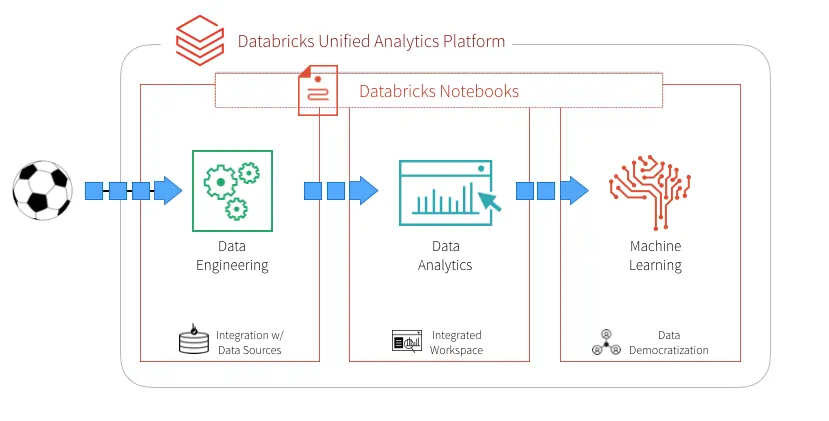
Databricks is a unified data analytics and AI platform built on a lakehouse architecture that combines data lakes and data warehouses. Founded by the original creators of Apache Spark, Databricks provides managed Spark clusters, collaborative notebooks, SQL analytics, machine learning experiment tracking, and a governance layer — all within a single cloud platform.
Core Capabilities:
- Managed Apache Spark clusters with auto-scaling
- Collaborative notebooks supporting Python, R, Scala, SQL simultaneously
- Delta Lake for reliable data lake storage with ACID transactions
- Unity Catalog for data governance and access control
- MLflow for machine learning experiment tracking and model registry
- Databricks SQL for BI-style querying on lakehouse data
- AI/BI dashboards for visual analytics
Deployment: Cloud (AWS, Azure, Google Cloud). No on-premise option.
Pricing Approach: Usage-based pricing. Costs vary by workload type (all-purpose compute, jobs compute, SQL compute) and cloud provider. Minimum costs can start around $0.10-0.40/DBU.
Documented Limitations:
- Complex for non-technical users despite efforts to simplify the interface
- Costs can scale rapidly with heavy compute workloads
- Cloud-only deployment may not suit organizations with on-premise requirements
- Requires data engineering expertise for optimal architecture design
Typical Users: Data engineering teams, data science teams in mid-to-large enterprises, organizations consolidating data lakes and warehouses, and AI/ML teams requiring experiment tracking and model deployment.
Google BigQuery
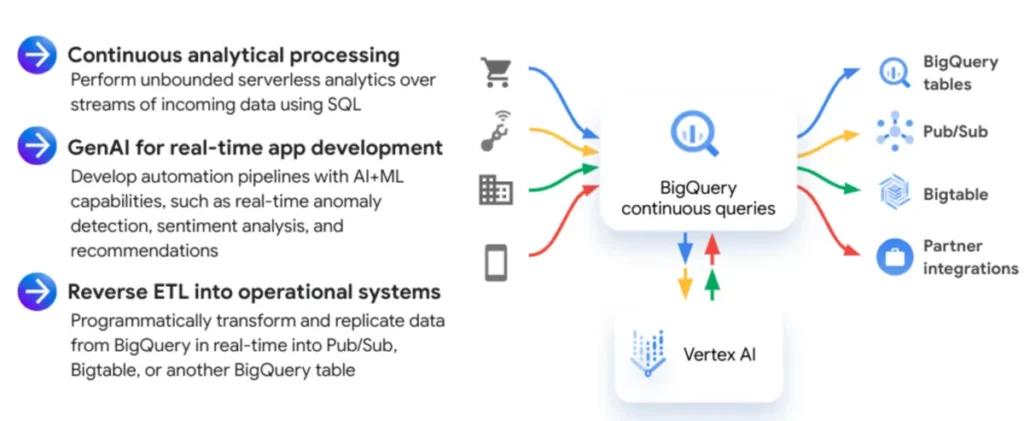
Google BigQuery is a serverless, highly scalable cloud data warehouse designed for SQL-based analytics. “Serverless” means users do not manage infrastructure — queries are executed on Google’s distributed computing infrastructure, and users pay based on the amount of data processed. BigQuery can analyze terabytes of data in seconds and petabytes within minutes.
Core Capabilities:
- Serverless SQL analytics with automatic scaling
- Real-time data ingestion and streaming
- BigQuery ML for machine learning using SQL syntax
- Geographic data analysis (GIS functions)
- Integration with Google Cloud services and BI tools
- Free tier: 1TB of queries and 10GB of storage per month
Deployment: Cloud-only (Google Cloud Platform)
Pricing Approach: Pay-per-query: $6.25 per TB processed. Flat-rate pricing available for predictable workloads. Free tier includes 1TB of queries and 10GB of storage monthly.
Documented Limitations:
- Costs can accumulate with frequent large queries if not managed carefully
- Google Cloud ecosystem dependency
- Not ideal for transactional (OLTP) workloads
- Requires SQL knowledge; no native visual interface for non-technical users (Looker Studio or Looker needed for visualization)
Typical Users: Data analysts running SQL on large datasets, data engineers building cloud data pipelines, organizations within the Google Cloud ecosystem, and teams needing fast querying across terabytes of data.
Snowflake
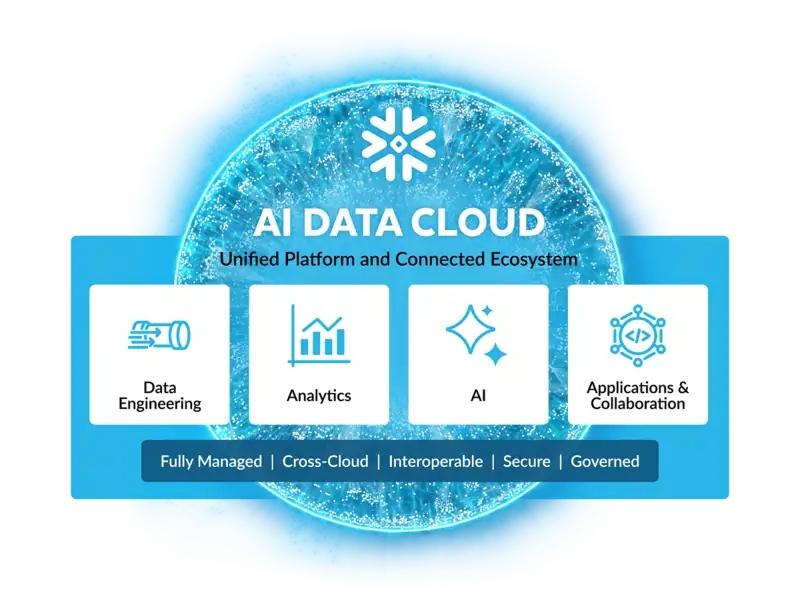
Snowflake is a cloud data platform that provides data warehousing, data lake, data engineering, and data sharing capabilities. Its multi-cluster shared data architecture separates storage from compute, allowing organizations to independently scale processing power and storage capacity. Snowflake operates across AWS, Azure, and Google Cloud, supporting a multi-cloud strategy.
Core Capabilities:
- Separation of storage and compute for independent scaling
- Near-unlimited concurrent query support through multi-cluster warehouses
- Secure data sharing across organizations (Snowflake Marketplace)
- Support for structured and semi-structured data (JSON, Avro, Parquet)
- Snowpark for custom code execution in Python, Java, and Scala
- Time travel and zero-copy cloning for data versioning
Deployment: Cloud (AWS, Azure, Google Cloud). Multi-cloud support.
Pricing Approach: Usage-based: separate charges for compute (credits) and storage. On-demand and pre-purchased capacity options. Free trial available.
Documented Limitations:
- Requires data engineering expertise for optimal cost management and architecture
- No native visualization layer — requires external BI tools
- Costs can escalate without careful warehouse sizing and query optimization
- Does not support on-premise deployment
Typical Users: Enterprise data teams managing centralized data warehouses, organizations needing secure cross-organizational data sharing, and companies implementing a modern cloud data stack.
dbt (data build tool)
dbt (data build tool) is an open-source command-line tool that enables analysts and engineers to transform data in their warehouse using SQL. Rather than managing extract-load-transform (ELT) pipelines through custom code, dbt provides a framework for writing modular SQL transformations, testing data quality, generating documentation, and managing dependencies between data models. dbt operates on the “T” in ELT — it does not extract or load data but transforms data already present in a warehouse.
Core Capabilities:
- SQL-based data transformation with modular, reusable models
- Built-in data testing (uniqueness, not-null, referential integrity, custom tests)
- Automatic documentation generation from model definitions
- Dependency management and directed acyclic graph (DAG) execution
- Version control integration (Git-based workflows)
- dbt Cloud: Managed environment with scheduling, IDE, and CI/CD features
Deployment: CLI (dbt Core — local), Cloud (dbt Cloud — hosted IDE and scheduler)
Pricing Approach: dbt Core is free and open-source. dbt Cloud offers free developer tier, Team ($100/month), and Enterprise (quote-based) plans.
Documented Limitations:
- Transformation only — does not handle data extraction, loading, or visualization
- Requires SQL knowledge and understanding of data warehousing concepts
- dbt Core (CLI) requires command-line proficiency and local environment setup
- Not a complete analytics solution; designed as one component of a larger data stack
Typical Users: Analytics engineers, data analysts writing SQL transformations, data teams implementing the “modern data stack” (ELT + cloud warehouse + BI tool), and organizations prioritizing data quality testing and documentation.
AI-Powered Analytics Tools
ChatGPT Advanced Data Analysis
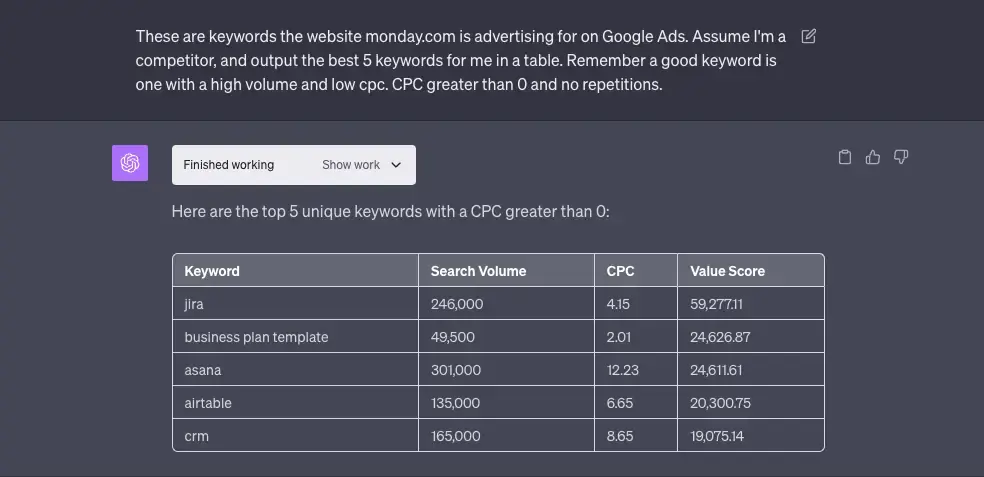
ChatGPT Advanced Data Analysis (previously known as Code Interpreter) is a feature within OpenAI’s ChatGPT that enables users to upload data files and analyze them through natural language conversation. When a user uploads a CSV, Excel file, or other dataset, ChatGPT generates and executes Python code in a sandboxed environment, returning visualizations, statistical summaries, and cleaned data — all without the user writing any code.
Core Capabilities:
- Natural language data analysis — describe what you want, receive code-generated results
- File upload support (CSV, Excel, JSON, PDF tables)
- Automatic Python code generation for cleaning, transformation, and visualization
- Statistical analysis, correlation detection, and trend identification
- Data visualization (matplotlib, seaborn) generated from conversation
- Iterative refinement — users can ask follow-up questions to adjust analysis
Deployment: Browser-based (chat.openai.com), mobile app, API
Pricing Approach: Available with ChatGPT Plus ($20/month), ChatGPT Team ($30/user/month), and ChatGPT Enterprise (quote-based). Limited access in free tier.
Documented Limitations:
- Cannot connect to live databases or APIs — analysis limited to uploaded files
- Context window limitations restrict the size of data that can be analyzed effectively
- Consistency of visual formatting can vary across sessions
- Results should be verified, as AI may produce plausible but incorrect analyses
- Not designed for production analytics or automated reporting
Typical Users: Business professionals wanting quick insights from spreadsheets, analysts prototyping analyses before building in production tools, students learning data analysis concepts, and non-technical users exploring data for the first time.
Julius AI
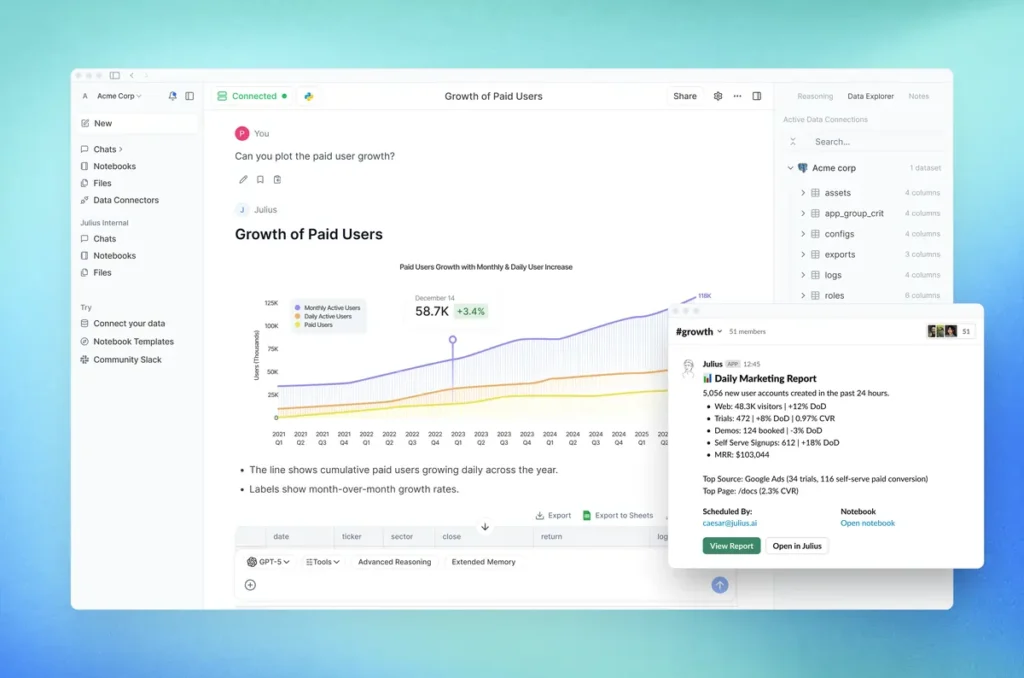
Julius AI is a data analysis platform that enables users to query connected databases and uploaded files through natural language, receiving charts, summaries, and scheduled reports without writing SQL or Python. Julius emphasizes a conversational interface where users describe what they want to know and receive visual answers linked back to source data.
Core Capabilities:
- Natural language querying of connected databases and uploaded files
- Automatic chart and table generation from conversational prompts
- Database connectors for direct analysis without data export
- Notebooks feature for recurring analysis workflows
- Scheduled reporting and alerts
- Source linking — generated insights reference underlying data for verification
Deployment: Browser-based (cloud), mobile accessible
Pricing Approach: Freemium model. Free tier with limited queries. Paid plans for additional capacity and database connections.
Documented Limitations:
- Newer platform with an evolving feature set; some advanced statistical capabilities are still developing
- Limited advanced customization compared to writing code directly
- Database connectivity options may not cover all enterprise data sources
- Relatively small user community compared to established BI platforms
Typical Users: Business users who need insights from databases without SQL skills, marketing teams analyzing campaign data, and small teams seeking an alternative to traditional BI dashboards.
ThoughtSpot
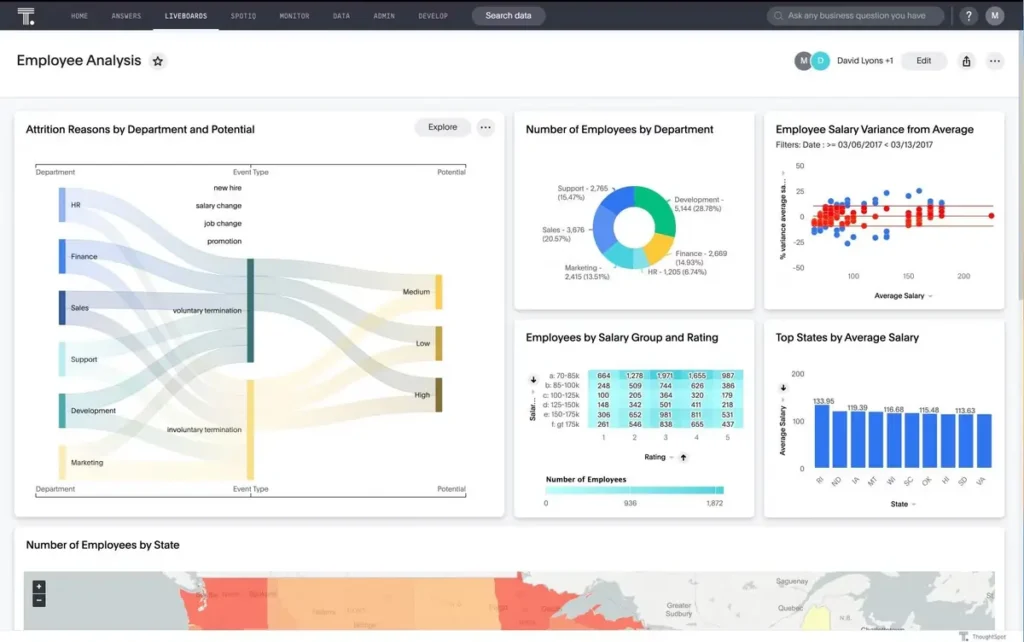
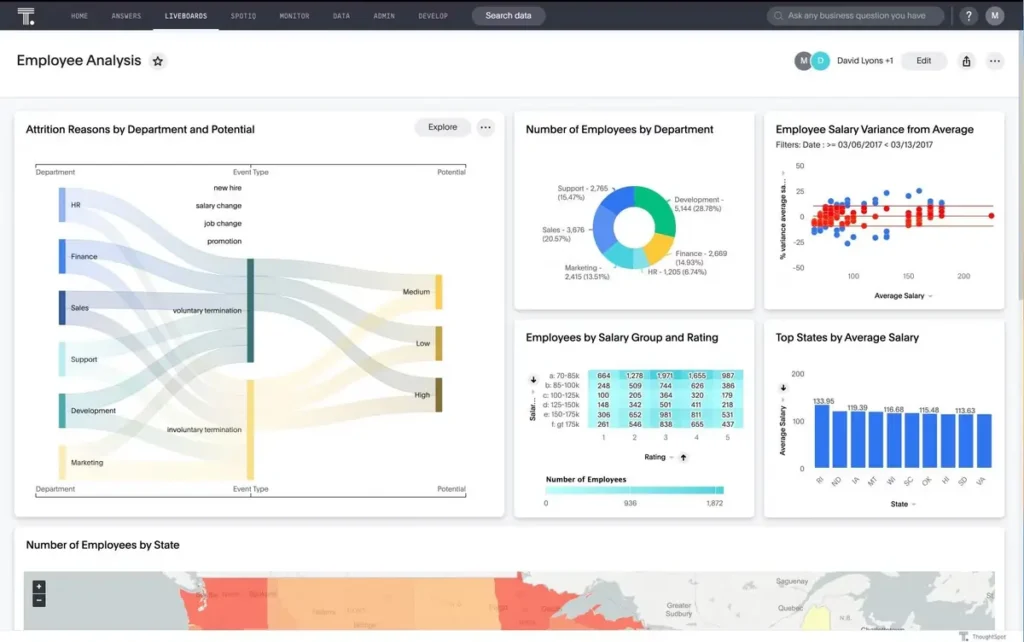
ThoughtSpot is an AI-powered analytics platform that enables users to search their data using natural language queries. Instead of building dashboards manually, users type questions and receive visual answers, similar to a search engine for enterprise data. ThoughtSpot was recognized as a Leader in the 2025 Gartner Magic Quadrant for Analytics and BI Platforms, with Gartner noting “increasing market interest” and strong embedded analytics capabilities. ThoughtSpot’s Spotter feature, launched in 2025, provides an agentic analytics experience with multi-step conversational analysis.
Core Capabilities:
- Search-driven analytics: type questions in natural language, receive visual answers
- Spotter: Agentic analytics with multi-step conversational exploration
- SpotIQ: AI-driven automatic insight detection and anomaly identification
- Embedded analytics for integrating into third-party applications
- Liveboard dashboards that combine search results into interactive views
- Full-stack analytics and data platform with governance features
Deployment: Cloud (SaaS). Supports connections to cloud data warehouses (Snowflake, BigQuery, Databricks, Redshift).
Pricing Approach: Enterprise pricing; quote-based. Not publicly listed. Free trial available.
Documented Limitations:
- Enterprise-focused pricing is not accessible or transparent for small teams
- Requires clean, well-modeled data for optimal search results
- Natural language queries may produce unexpected results with complex or ambiguous questions
- Implementation requires data modeling and configuration
Typical Users: Enterprise analytics teams, product teams embedding analytics, data-driven organizations seeking to replace dashboard-centric approaches, and Fortune 500 companies referenced in ThoughtSpot’s customer base (NVIDIA, Toyota, Hilton, Capital One).
Power BI Copilot
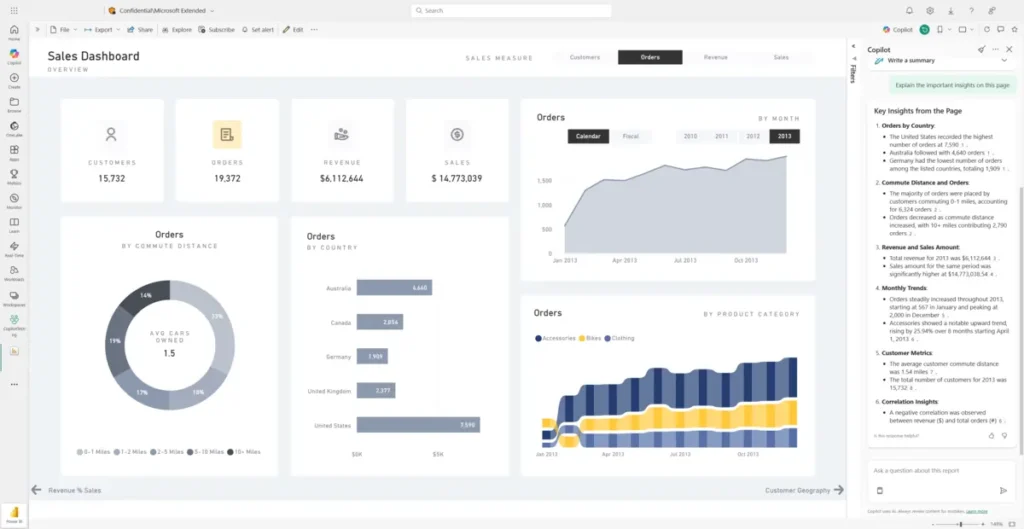
Power BI Copilot is Microsoft’s AI assistant integrated directly into Power BI, leveraging large language model capabilities to enable natural language interaction with reports and data. Users can ask Copilot to create visuals, summarize reports, generate DAX formulas, build narrative summaries, and answer questions about their data — all through conversational prompts within the Power BI interface.
Core Capabilities:
- Natural language report creation — describe a visual, Copilot builds it
- Automatic narrative summaries of dashboard pages
- DAX formula generation from natural language descriptions
- Q&A on data — ask business questions and receive visual answers
- Report page suggestions and layout recommendations
Deployment: Integrated into Power BI Service (cloud) and Power BI Desktop. Requires Fabric or Power BI Premium capacity.
Pricing Approach: Included with Power BI Premium Per User ($20/user/month) or Microsoft Fabric capacity licensing. Not available in free or Pro tiers.
Documented Limitations:
- Requires Premium or Fabric licensing; not available in free or standard Pro tiers
- DAX suggestions handle approximately 80% of use cases accurately; complex formulas may need manual refinement
- Available in limited languages as of early 2026
- Results depend on data model quality; poorly structured models produce less useful outputs
Typical Users: Existing Power BI users seeking faster report creation, business analysts wanting to reduce DAX learning curve, and organizations with Fabric or Premium licensing.
Tableau AI
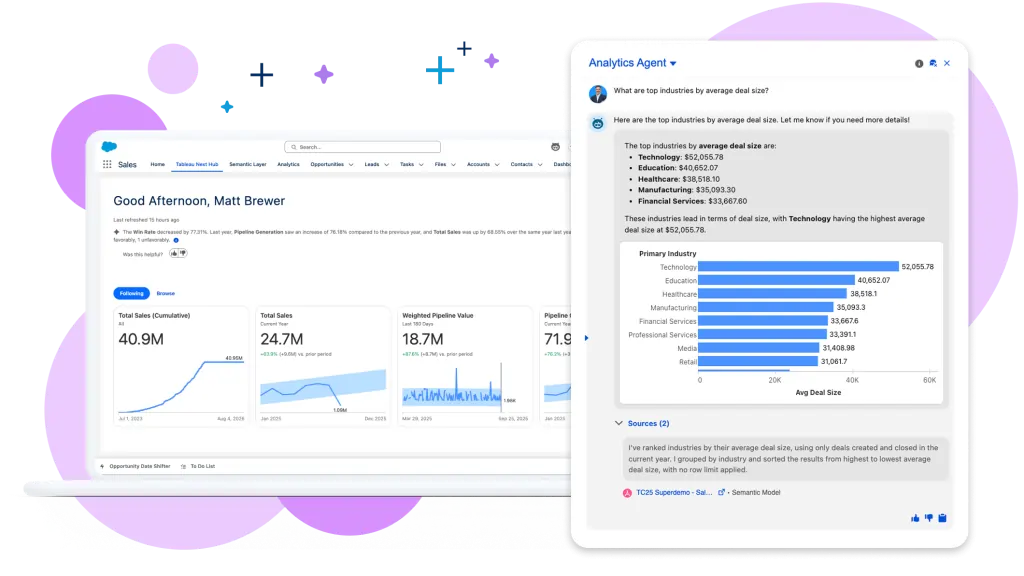
Tableau AI encompasses a suite of artificial intelligence features integrated into the Tableau platform, including Tableau Pulse (automated insights pushed to users proactively), Ask Data (natural language query interface), and AI-powered predictions and recommendations. These features are designed to bring AI capabilities to users within the familiar Tableau environment.
Core Capabilities:
- Tableau Pulse: Automated, personalized metric monitoring and proactive insights
- Ask Data: Natural language querying of Tableau data sources
- Einstein Discovery: Predictive analytics and recommendations (via Salesforce integration)
- AI-suggested visualizations and data formatting
- Explain Data: Automated explanations for data outliers
Deployment: Integrated into Tableau Cloud and Tableau Server
Pricing Approach: Included with Tableau Creator and Explorer licenses. Some advanced AI features require Salesforce Data Cloud integration.
Documented Limitations:
- Natural language query accuracy depends on data model clarity and naming conventions
- Advanced AI features (Einstein Discovery) require Salesforce ecosystem integration
- Pulse metrics require administrative setup and configuration
- AI features are evolving; some capabilities are in beta or limited availability
Typical Users: Existing Tableau users wanting AI augmentation, Salesforce ecosystem organizations, and BI teams seeking to automate insight delivery.
Market Patterns and Key Observations
Common Capabilities Across Solutions
A convergence pattern is visible across all six categories of data analysis tools in 2026. Nearly every major platform now includes some form of natural language interface — whether through Microsoft Copilot in Excel and Power BI, Gemini in Google Sheets and Looker, Tableau AI’s Ask Data, or ThoughtSpot’s Spotter. This convergence means the traditional boundary between “tools for technical users” and “tools for business users” is eroding. According to Gartner, 90% of current analytics content consumers are expected to become content creators by 2026, enabled precisely by these AI augmentation capabilities.
Data connectivity has also become table stakes. Every BI platform reviewed supports connections to cloud data warehouses (Snowflake, BigQuery, Databricks), most SaaS applications, and standard file formats. The differentiation is no longer whether a tool can connect to your data, but how efficiently it models, governs, and presents that data once connected.
Shared Limitations and Trade-offs
Despite the breadth of options, several limitations persist across the landscape. Data quality remains the most frequently cited barrier to effective analysis. A Harvard Business Review study estimated that poor data quality costs organizations an average of $12.9 million per year. No tool, regardless of sophistication, can produce reliable insights from unreliable data — yet most tools reviewed offer only basic data profiling and cleaning features, with the notable exceptions of Alteryx, KNIME, and Python’s pandas library.
Vendor lock-in is another recurring concern. Organizations that build extensive reporting in Tableau face significant migration costs to move to Power BI, and vice versa. Cloud data platforms (Snowflake, BigQuery, Databricks) each create ecosystem dependencies through proprietary features, storage formats, and pricing models. The Cloud Native Computing Foundation and open-source projects like Apache Arrow aim to mitigate this through standardized data interchange formats, but lock-in risk remains a practical consideration.
AI-powered analytics introduce a new category of limitation: reliability. While natural language query features lower the barrier to entry, they also introduce the risk of plausible-but-incorrect results. Every AI-powered tool reviewed — without exception — requires human verification of outputs, particularly for business-critical decisions. The industry consensus, reflected in MIT Technology Review reporting and Stanford HAI research, is that AI augments human analysts rather than replacing them.
Pricing Trends in 2026
The pricing landscape for data analysis tools follows three dominant models. Subscription-based pricing (per user, per month) dominates the BI platform category, with entry points ranging from free (Power BI Desktop, Looker Studio) to $75/user/month (Tableau Creator). Usage-based pricing (pay-per-query or compute-hour) is standard for cloud data platforms, where costs scale with data volume and processing intensity. Enterprise quote-based pricing remains the norm for specialized platforms (SAS, ThoughtSpot, Alteryx, Domo), where costs vary substantially based on organization size, modules selected, and negotiated terms.
A notable trend is the expansion of free tiers. Power BI Desktop, Looker Studio, Google Sheets, Python, R, SQL, Jupyter, DuckDB, KNIME, dbt Core, and Google BigQuery’s 1TB/month free tier collectively mean that a functional data analysis stack can be assembled at zero cost — a situation that was not possible five years ago. This has significant implications for students, freelancers, startups, and small organizations that previously faced cost barriers to analytics adoption.
Integration and Ecosystem Patterns
The “modern data stack” — a term that gained traction during 2020-2024 — describes a common architectural pattern: cloud data warehouse (Snowflake or BigQuery) + transformation layer (dbt) + BI tool (Looker, Power BI, or Tableau) + orchestration (Airflow or Dagster). This pattern reflects a shift away from monolithic platforms toward composable architectures where each layer is handled by a specialized tool.
However, the counter-trend is equally strong. Microsoft Fabric bundles data engineering, data warehousing, real-time analytics, data science, and BI into a single platform. Databricks positions its lakehouse as an all-in-one alternative to the multi-tool stack. This tension — composable vs. unified — represents one of the most consequential architectural decisions organizations face in 2026.
Emerging Capabilities to Watch
Three emerging capabilities are reshaping expectations for data analysis tools. First, agentic analytics — where AI doesn’t just answer questions but proactively identifies anomalies, generates hypotheses, and takes automated actions — is moving from concept to product. ThoughtSpot’s Spotter and Microsoft’s Copilot are early implementations. Second, semantic layers (Looker’s LookML, dbt’s metrics layer, AtScale) are gaining adoption as organizations recognize the need for consistent metric definitions across tools. Third, embedded analytics — integrating analysis capabilities directly into operational applications rather than requiring users to switch to a separate BI tool — is growing rapidly, with Gartner noting embedded capabilities as a key differentiator in the 2025 Magic Quadrant evaluation.
How to Choose the Right Data Analysis Tool
Selecting a data analysis tool is not a question of finding the single “best” option — it is a question of matching tool capabilities to specific requirements. The following framework organizes the decision across five dimensions that apply regardless of whether the user is a student, a solo analyst, or a team leader evaluating enterprise platforms.
Key Questions to Ask Before Choosing
Skill Level and Learning Investment:
- What is your current comfort level with coding? (None, basic, proficient)
- How much time can you invest in learning a new tool? (Hours, weeks, months)
- Does your team have diverse skill levels that require different interfaces?
- Will AI-assisted features (natural language queries, Copilot) reduce the learning curve sufficiently?
Data Characteristics:
- How large are your datasets? (Under 100K rows, 100K–10M rows, 10M+ rows)
- How many data sources do you need to connect? (1–2, 3–10, 10+)
- Is your data structured (tables, databases), semi-structured (JSON, logs), or unstructured (text, images)?
- Do you need real-time data access, or is periodic refresh acceptable?
Use Case and Output Requirements:
- Is your primary goal to explore data, build dashboards, automate reports, or build predictive models?
- Who consumes your analysis? (Yourself, your team, executive leadership, external clients)
- Do you need publication-quality visualizations, or are functional charts sufficient?
- Is reproducibility important? (Regulatory, academic, or audit requirements)
Budget and Organizational Context:
- What is your budget? ($0, under $50/month, enterprise budget)
- Are you working alone, in a small team, or in a large organization with IT governance?
- Does your organization already use Microsoft 365, Google Workspace, or Salesforce?
- Are there compliance requirements (HIPAA, SOX, GDPR) that constrain tool selection?
Scalability and Future Needs:
- Do you anticipate your data volume or team size growing significantly?
- Will you need to integrate analytics into applications or products (embedded analytics)?
- Is portability important — could you need to switch tools in the future?
- Do you need to collaborate across departments or organizations?
Decision Matrix Template
| Factor | Weight (Your Priority) | Questions to Evaluate |
|---|---|---|
| Technical accessibility | High / Medium / Low | Does the tool match your team’s current skill level? |
| Data scale compatibility | High / Medium / Low | Can the tool handle your current and projected data volume? |
| Integration with existing systems | High / Medium / Low | Does the tool connect to your current data sources and workflows? |
| Total cost (licensing + training + maintenance) | High / Medium / Low | Does the total cost align with your budget over 12-24 months? |
| Visualization and reporting quality | High / Medium / Low | Does the output quality meet your audience’s expectations? |
| Collaboration features | High / Medium / Low | Can multiple users work together effectively? |
| Compliance and governance | High / Medium / Low | Does the tool support your regulatory and security requirements? |
| Vendor stability and community | High / Medium / Low | Is the vendor financially stable? Is there a strong user community? |
Common Starting Points by Profile
The following mapping reflects common adoption patterns observed across the tools reviewed — these are not recommendations but descriptions of documented usage patterns.
Complete beginners with no coding experience often start with Microsoft Excel or Google Sheets, progressing to Looker Studio or Power BI for visualization as their needs grow. These tools require no programming skills and are accessible through familiar interfaces.
Analysts learning to code typically begin with SQL for database querying, then add Python (with pandas and matplotlib) for more flexible analysis. Jupyter Notebooks provide an interactive environment for this learning path. Free resources from Google’s Data Analytics Certificate, Coursera, and Khan Academy support this progression.
Business teams in Microsoft environments frequently adopt Power BI due to its native integration with Excel, Teams, SharePoint, and Azure. The free Desktop version allows individual analysis, while Pro and Premium tiers enable organizational sharing and Copilot AI features.
Data science and research teams typically work with Python and R in Jupyter or RStudio environments, connecting to cloud data warehouses via SQL. They may use specialized tools (SAS, SPSS, Stata) for domain-specific statistical requirements.
Organizations building a data stack commonly evaluate cloud data warehouses (Snowflake, BigQuery, or Databricks) paired with dbt for transformation and a BI layer (Looker, Tableau, or Power BI) for visualization — following the composable “modern data stack” pattern.
Frequently Asked Questions About Data Analysis Tools
What are data analysis tools?
Data analysis tools are software applications and programming environments designed to help users collect, clean, organize, analyze, and visualize data to extract meaningful insights. They range from familiar spreadsheet programs like Microsoft Excel and Google Sheets to advanced platforms powered by artificial intelligence. According to Fortune Business Insights, the global data analytics market was valued at $82.2 billion in 2025, reflecting the widespread adoption of these tools across virtually every industry. The six main categories of data analysis tools include spreadsheets, business intelligence platforms, programming languages, statistical software, cloud data platforms, and AI-powered analytics tools.
What are the most widely used data analysis tools in 2026?
The most widely used data analysis tools in 2026 include Microsoft Excel (over 1 billion users in the Microsoft Office ecosystem), Microsoft Power BI (over 30 million monthly active users), Python (the most-wanted programming language according to the Stack Overflow 2024 Developer Survey), SQL (the foundational language for querying relational databases), Google Sheets, and Tableau. In the enterprise BI segment, the 2025 Gartner Magic Quadrant for Analytics and BI Platforms identified Microsoft, Salesforce (Tableau), Google (Looker), Qlik, Oracle, and ThoughtSpot as Leaders.
Can I do data analysis without coding?
Yes. Multiple data analysis tools are designed for users with no coding skills. Spreadsheet tools (Excel, Google Sheets), BI platforms (Power BI, Tableau, Qlik Sense, Looker Studio), visual workflow builders (KNIME, RapidMiner), and AI-powered analytics tools (ChatGPT Advanced Data Analysis, Julius AI, ThoughtSpot) all provide graphical or conversational interfaces for analysis. According to Gartner, the integration of AI into analytics platforms is expected to transform 90% of analytics content consumers into content creators by 2026 — specifically because AI reduces the need for coding proficiency.
What is the easiest data analysis tool to learn?
Microsoft Excel and Google Sheets are generally considered the easiest data analysis tools for beginners because of their familiar grid-based interfaces and minimal setup requirements. For users who want visualization capabilities without coding, Looker Studio (free) and Power BI Desktop (free) offer drag-and-drop interfaces that can be productive within hours. Among AI-powered tools, ChatGPT Advanced Data Analysis requires the least technical knowledge — users simply upload a file and describe their analysis goals in plain English. The appropriate starting tool depends on the specific analysis task; a user analyzing website traffic would start with Google Analytics, while someone exploring business data would likely begin with Excel or Power BI.
What is the difference between data analysis and data analytics?
Data analysis and data analytics are closely related but have distinct scopes. Data analysis is the process of inspecting, cleaning, transforming, and interpreting a specific dataset to answer particular questions — it is typically focused on understanding what happened and why. Data analytics is a broader discipline that encompasses data analysis but also includes predictive modeling (forecasting what will happen), prescriptive analytics (recommending what to do), and the design of systems for ongoing data collection and processing. In practice, “data analysis tools” and “data analytics tools” are often used interchangeably, though tools like SAS, Python’s scikit-learn, and Databricks extend into predictive and prescriptive analytics territory. Syracuse University’s iSchool provides a detailed comparison of the two terms in an academic context.
How much do data analysis tools cost in 2026?
Data analysis tool costs in 2026 range from completely free to over $100,000 per year for enterprise deployments. A functional analytics stack can be assembled at zero cost using free tools: Google Sheets or Excel Online for spreadsheets, Python and Jupyter for coding, SQL with PostgreSQL for databases, DuckDB for local analytics, Looker Studio for dashboards, and KNIME for visual workflows. Mid-range options include Power BI Pro ($14/user/month), Tableau Explorer ($42/user/month), and SPSS ($99/month). Enterprise platforms like SAS, ThoughtSpot, Alteryx ($4,950+/year), and Snowflake use quote-based or usage-based pricing that scales with organizational size and data volume. Cloud data platforms (BigQuery, Snowflake, Databricks) use consumption-based pricing where costs depend on query volume and compute usage.
What data analysis tools do employers look for?
Based on analysis of job postings and industry surveys, the data analysis tools most frequently requested by employers include SQL (the most universally required skill for data roles), Excel, Python, Tableau, and Power BI. The Google Data Analytics Certificate curriculum reflects this demand by teaching spreadsheets, SQL, R, and Tableau. According to the U.S. Bureau of Labor Statistics, employment for data scientists is projected to grow 36% from 2023 to 2033, much faster than the average for all occupations — reflecting sustained demand for professionals skilled in these tools. For enterprise-focused roles, familiarity with cloud platforms (Snowflake, BigQuery, Databricks) and transformation tools (dbt) is increasingly valued.
What are the 5 types of data analysis?
The five commonly recognized types of data analysis are: (1) Descriptive analysis, which summarizes what happened using metrics, aggregations, and visualizations — tools like Excel, Power BI, and Tableau excel here. (2) Diagnostic analysis, which investigates why something happened using drill-down, filtering, and correlation techniques. (3) Predictive analysis, which forecasts what is likely to happen using statistical models and machine learning — tools like Python (scikit-learn), R, SAS, and RapidMiner are commonly used. (4) Prescriptive analysis, which recommends what actions to take based on predicted outcomes. (5) Exploratory analysis, which examines data without a specific hypothesis to discover patterns and generate new questions — Jupyter Notebooks, Qlik Sense’s associative engine, and Python’s pandas library are frequently used for this purpose.
Is Tableau a data analysis tool?
Yes. Tableau is a data visualization and analytics platform that qualifies as a data analysis tool because it enables users to connect to data sources, explore patterns through interactive visualizations, perform calculations, and generate analytical insights. Tableau was identified as a Leader in the 2025 Gartner Magic Quadrant for Analytics and BI Platforms. While Tableau is primarily known for visualization, its capabilities extend to data blending (combining multiple sources), calculated fields for statistical computations, Tableau Prep for data cleaning, and AI-powered features (Ask Data, Tableau Pulse) for natural language querying and automated insights. Tableau’s pricing ranges from $15/user/month (Viewer) to $75/user/month (Creator).
Are there free data analysis tools?
Multiple capable data analysis tools are available at no cost. Programming tools including Python, R, SQL (via PostgreSQL or MySQL), Jupyter Notebooks, and DuckDB are fully open-source and free. Among platforms, Power BI Desktop, Looker Studio, Google Sheets, KNIME Analytics Platform, dbt Core, and Google BigQuery’s free tier (1TB queries/month) provide substantial capabilities at zero cost. Google Colab offers free cloud-based Jupyter notebooks with GPU access. The primary trade-offs with free tools are collaboration limitations (free tiers often restrict sharing), row or data volume limits, and the absence of enterprise governance and support features.
How is AI changing data analysis tools in 2026?
AI is transforming data analysis tools through three primary mechanisms in 2026. First, natural language interfaces allow users to analyze data by typing questions in plain English rather than writing code or building queries — Microsoft Copilot in Power BI, Gemini in Google Sheets and Looker, Tableau AI, and ThoughtSpot’s Spotter all implement this approach. Second, automated insight generation proactively surfaces patterns, anomalies, and trends without users having to ask specific questions — Tableau Pulse and ThoughtSpot’s SpotIQ are examples. Third, AI-assisted code and formula generation helps users write SQL, Python, DAX, or spreadsheet formulas through conversational prompts. According to Gartner, by 2026, 75% of businesses will use generative AI to create synthetic data for analytics. However, the documented consensus across MIT Technology Review and Stanford HAI research is that AI augments rather than replaces human analysts, as AI-generated insights require human verification for accuracy and strategic context.
How long does it take to learn a data analysis tool?
Learning timelines for data analysis tools vary significantly by tool category and prior experience. Spreadsheet tools (Excel, Google Sheets) can be productive within days for basic tasks, though mastering advanced features like Power Query, pivot tables, and VBA may take months. BI platforms (Power BI, Tableau) typically require 2-4 weeks of focused learning for basic dashboard creation, and several months for advanced features like DAX or LOD expressions. Programming languages (Python, R, SQL) require the most investment — Google’s Data Analytics Certificate estimates under 6 months at 10 hours per week to build foundational skills in spreadsheets, SQL, R, and Tableau. AI-powered tools (ChatGPT Advanced Data Analysis, Julius AI) have the shortest learning curve, as they require only the ability to describe analytical goals in natural language, though interpreting and verifying AI-generated results still requires analytical thinking.
What should beginners prioritize when choosing a data analysis tool?
Beginners should prioritize three factors when selecting a data analysis tool: relevance to their goals, accessibility, and career alignment. If the goal is to understand business data, starting with Excel or Google Sheets and progressing to Power BI or Tableau provides a practical, no-code path with strong job market relevance. If the goal is a data science or engineering career, learning SQL and Python early — using free resources from Coursera, Khan Academy, and freeCodeCamp — builds foundational skills that transfer across tools and roles. Beginners should avoid trying to learn too many tools simultaneously; proficiency in one spreadsheet tool, one BI platform, and one programming language (typically SQL) covers the requirements for most entry-level data analyst positions. According to the U.S. Bureau of Labor Statistics, the median annual wage for data scientists was $108,020 in 2023, making the investment in learning these tools financially worthwhile.
Key Takeaways
- The data analytics market exceeded $69 billion in 2024 and is growing at a CAGR near 29%, reflecting accelerating demand for data analysis tools across industries of every size, according to Grand View Research.
- AI integration is the defining trend of 2026 — every major BI platform (Power BI, Tableau, Looker, Qlik, ThoughtSpot) now includes natural language query capabilities, reducing the coding barrier but requiring human verification of AI-generated outputs.
- A functional data analysis stack can be assembled at zero cost using free and open-source tools (Python, SQL, Jupyter, DuckDB, KNIME, Looker Studio, Google Sheets, Power BI Desktop), making analytics accessible to students, freelancers, and small organizations.
- No single tool covers all data analysis needs — organizations and individuals typically use a combination of tools (often a spreadsheet + a BI platform + a programming language or database query tool) depending on data volume, team skills, and output requirements.
- Tool selection should be driven by data characteristics, team skill level, and use case requirements rather than by vendor marketing or feature lists — the most effective tool is the one that matches your specific context and gets used consistently.
This analysis was last updated February 2026. The data analysis tools market evolves rapidly; readers should verify current pricing and feature availability directly with vendors.