

How to View Instagram Stories 2026
Quick Answer: To view Instagram stories normally, open the Instagram app and tap any circle at the top of your home feed — or tap someone’s profile picture to watch their active story. To watch a story without the person knowing, the only reliable method in 2026 is a web-based anonymous viewer (for public accounts only) — Instagram has no native option to hide your view. To view stories without an Instagram account, use a web viewer for public profiles. Expired stories disappear after 24 hours and cannot be retrieved unless the account owner saved them to Highlights.
Time needed: 1–2 minutes Difficulty: Beginner Works on: iPhone (iOS 16+) and Android (Instagram app version 360+) What you’ll need: The Instagram app installed, or a browser for anonymous/no-account methods
Why Instagram Stories Are Worth Understanding Fully
Instagram Stories are one of the most-used features on any social platform. According to Meta, over 500 million people watch Instagram Stories every single day — roughly one in six monthly active users engaging with the format daily. They expire after 24 hours, which creates real urgency and a genuine desire to catch them before they disappear.
That urgency also drives a secondary reality: millions of people want to watch specific stories without triggering a notification to the person who posted them. Whether it’s competitor research, checking on an ex, or simply maintaining privacy while browsing, the “anonymous story viewing” question is the most-searched Instagram intent in 2026. This guide covers every legitimate method — what actually works, what doesn’t, and why.
Part 1: How to View Instagram Stories Normally
On iPhone and Android (Same Steps for Both)
The Instagram app for iOS and Android uses an identical interface for story viewing in 2026. There is no meaningful difference between platforms here.
Method A: View from Your Home Feed
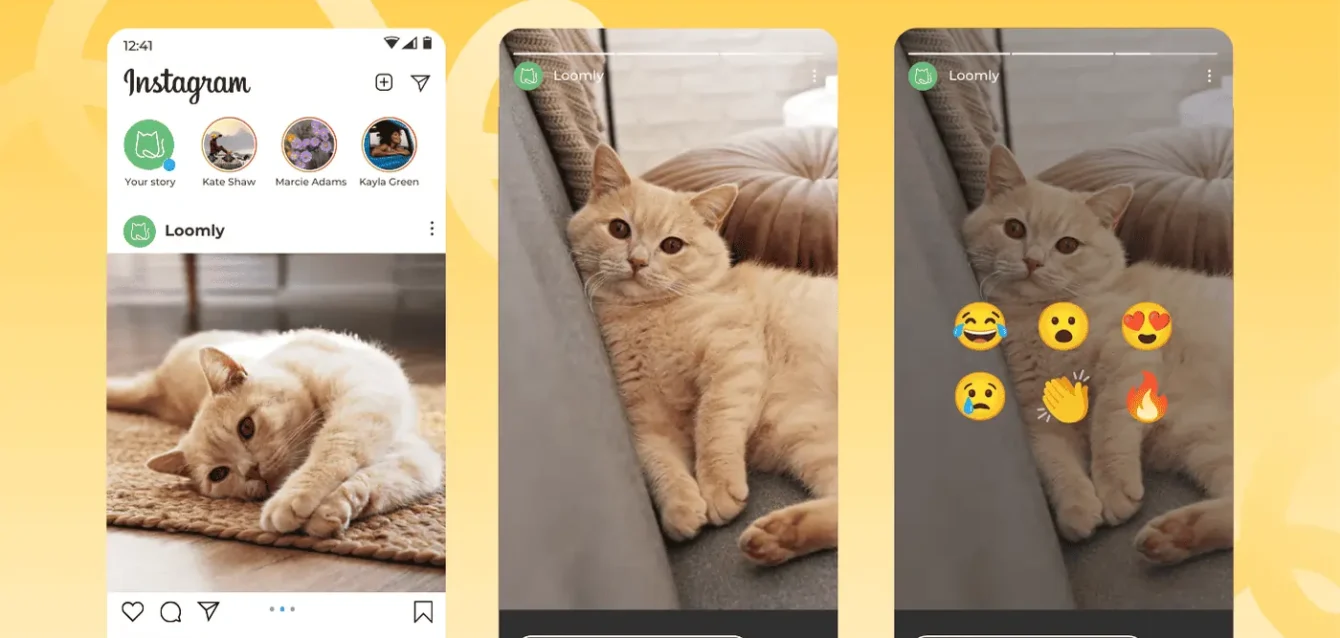
Step 1: Open Instagram Launch the Instagram app. You’ll land on your home feed automatically.
You should see: A horizontal row of circular profile pictures at the very top of the screen, above your posts feed. Accounts with active stories have a colored ring (gradient of orange-pink) around their profile circle.
Step 2: Tap a story circle Tap any circle in that top row to open the story.
You should see: The story fills your full screen. A thin progress bar appears at the top — one segment per story frame. A username and profile picture appear in the top-left corner.
Step 3: Navigate within the story
- Tap the right side of the screen to skip to the next frame
- Tap the left side to go back to the previous frame
- Swipe left to jump to the next person’s story
- Swipe down to exit the story entirely and return to your feed
Step 4: Reply or react (optional) At the bottom of the screen you’ll see a text field labeled “Send message” and a paper airplane icon (share). Tap the text field to reply via DM, or tap the reaction emojis to send a quick emoji reaction.
Method B: View from a Specific Person’s Profile
Step 1: Navigate to their profile Tap the search icon (magnifying glass at the bottom), type their username, and tap their profile.
You should see: Their profile page with their posts grid. If they have an active story, their profile picture will have the colored gradient ring around it.
Step 2: Tap their profile picture Tap directly on the profile picture at the top-left of their profile.
You should see: Their current story opens in full screen, exactly as in Method A.
What if no ring is showing? Either they have no active story right now, or you’ve already viewed all of their current stories (in which case, the ring appears in a faded/grey color rather than the gradient).
Viewing Story Highlights (Permanent Stories)
Account owners can save stories to Highlights — curated collections that live permanently on their profile below their bio. Highlights never expire.
Step 1: Open their profile Step 2: Scroll below the bio — you’ll see circular icons with labels (these are Highlight albums) Step 3: Tap any Highlight circle to open and watch the stories saved inside it
Highlights are visible to anyone who can view the profile — followers only if the account is private, everyone if it’s public.
Part 2: How to View Instagram Stories Anonymously (Without Them Knowing)
This is the dominant reason people search “view Instagram stories” — and it requires an honest breakdown of what actually works in 2026 versus what’s outdated advice.
The Reality: No Native Instagram Feature Hides You
Instagram does not offer any built-in setting that lets you watch a story without appearing in the viewer list. There is no “stealth mode,” no privacy toggle, and no setting combination that achieves this. Anyone who watched your story appears in your viewers list — period.
The three methods below are your actual options, ranked from most reliable to least.
Method 1: Web-Based Anonymous Story Viewers (Most Reliable)
How it works: These tools access Instagram’s publicly available story endpoints through their own servers — not through your account. When the request comes from their servers, Instagram registers a view from an anonymous system, not from your username. Your name never touches the viewer list.
What this can and cannot do:
- ✅ Completely anonymous for public Instagram accounts
- ✅ Works without an Instagram account
- ✅ Works on iPhone, Android, and desktop browsers
- ❌ Cannot access private accounts — their content is hidden at the server level regardless of any tool
- ❌ Cannot access Close Friends stories — those are exclusively visible to the account owner’s selected list
How to use one:
Step 1: Open your browser (Safari, Chrome, Firefox — any works)
Step 2: Go to a web-based story viewer such as StoriesIG, InstaNavigation, or Iganony (search “anonymous Instagram story viewer” and choose a result that does not require you to log in to your own Instagram account)
Important: Use only web-based tools that run entirely in your browser and ask for nothing but a username. Avoid any tool that asks you to enter your Instagram password, connect your account, or download an app. Those tools access stories through your own account — which defeats the purpose and puts your account at risk.
Step 3: Type in the username of the public account whose story you want to view
Step 4: Browse their stories — you won’t appear in their viewer list at all, because the request never came from your account
Limitations to know: These tools only work for public accounts. They also rely on accessing content through Instagram’s public-facing infrastructure — Instagram periodically blocks specific tools, which is why tool availability fluctuates. If one stops working, search for an alternative; the category of tools is stable even if individual domains change.
Method 2: Create a Second Account (Pseudonymous, Not Truly Anonymous)
If you have an Instagram account that the person doesn’t associate with you, you can watch their stories logged in as that secondary account. You’ll appear in their viewer list — but under a username they don’t recognize.
When this is useful: You want to watch stories from a private account you follow with an alternate account they haven’t connected to your identity.
When this doesn’t work: If the account is private, they have to approve your follow request first — which triggers a notification anyway. Also, some people recognize patterns in usernames or follower lists.
This is pseudonymous, not anonymous. The account owner still sees that someone watched their story. They just may not know it’s you.
Method 3: Airplane Mode (Largely Unreliable in 2026 — Be Aware)
This trick is still widely recommended in articles written in 2023 and 2024. In 2026, it is inconsistent and largely unreliable on both iPhone and Android. Here’s what it requires and why it often fails:
The theory: Open Instagram, let the app preload stories while connected, switch to airplane mode before watching, then watch offline — the view isn’t registered because you’re disconnected.
Why it fails in 2026: Instagram’s app no longer consistently preloads stories before you tap them. On feeds with many followers, stories are loaded on-demand rather than pre-fetched. If the story didn’t fully preload before you went offline, it either won’t play or will partially buffer and then fail. Even when it does preload, Instagram may log the view when you reconnect to the internet.
The verdict: Don’t count on airplane mode. If you care about anonymity, use a web-based tool. Airplane mode may occasionally work on a specific device with a specific caching state, but it’s not a method you can rely on.
Part 3: How to View Instagram Stories Without an Account
Instagram increasingly requires login to view content in 2026, including on the desktop website. Attempting to visit a public profile at instagram.com without logging in usually redirects to a sign-up prompt.
The reliable solution: The same web-based story viewers from Part 2 work here — they don’t require you to have or log in to any Instagram account. Just enter the public username, and the tool fetches and displays the story content directly.
For Highlights specifically: Some anonymous web viewers also display Highlights, not just current active stories. This is useful if you want to browse someone’s permanent saved content without creating an account.
What you cannot access without an account under any method: Private accounts, Close Friends stories, direct messages, or any content from accounts that have restricted or blocked you.
Part 4: How to View Old or Expired Instagram Stories
Instagram stories disappear 24 hours after posting. Here’s what you can and cannot retrieve afterward.
Your Own Expired Stories (Instagram Archive)
Instagram automatically saves your own stories to a private Archive — only visible to you — unless you’ve disabled that setting.
Step 1: Open Instagram and go to your profile (tap your profile picture in the bottom-right corner)
Step 2: Tap the three horizontal lines (menu) in the top-right corner
Step 3: Tap Archive
You should see: A “Stories Archive” option at the top, followed by a grid view of all your saved stories sorted by date
Step 4: Tap any story to view it or re-share it
If your Archive appears empty: Go to Settings → Privacy → Story → Save Story to Archive and make sure this toggle is turned on. Instagram only saves stories to Archive when this setting is enabled — and it’s on by default for most accounts, but it can be accidentally turned off.
Someone Else’s Expired Stories
Once someone else’s story expires, it is gone from Instagram for everyone except the person who posted it (who can see it in their Archive). There is no method — native or third-party — to view another person’s expired story after the 24-hour window has passed, unless they saved it.
The one exception: Highlights. If the account owner added a story to one of their Highlight albums before it expired, it lives on in their Highlights. You can view those anytime by tapping the Highlight circles on their profile.
Troubleshooting: Why You Can’t See Someone’s Story
Problem: The gradient ring is showing but the story won’t play
Cause: Poor connection, or a story that loaded partially Fix: Close and reopen the app. Make sure you’re on Wi-Fi or a strong cellular signal. Force-quit Instagram (swipe it away in the app switcher) and reopen.
Problem: Someone’s profile shows no story ring, but you think they posted one
Cause 1: You’ve already viewed their entire current story — the ring turns grey/faded after you’ve watched all frames Cause 2: They may have deleted the story after posting Cause 3: If their account is private and you’re not a follower, you won’t see their stories at all Cause 4: They may have posted to Close Friends, and you’re not on their list
Problem: You can’t find someone’s profile at all
Cause: They may have blocked you, deactivated their account, or changed their username Fix: Try searching on a different account or in an incognito browser window to check if the profile exists publicly
Problem: The anonymous web viewer says “No stories found”
Cause 1: The account has no active stories right now Cause 2: The account is private Cause 3: The username was entered incorrectly (check for typos, dots, underscores) Fix: Double-check the exact username by searching on Instagram.com, then re-enter it in the viewer
Problem: You’re seeing someone’s story but they’re not seeing yours
Cause: They may have muted your stories. Muting removes your stories from their feed but doesn’t prevent them from finding your profile and watching manually Note: There’s no way to tell if someone has muted your stories
Pro Tips for Power Users
Pause a story without tapping back: Press and hold anywhere on the screen to pause a story frame — useful for reading text-heavy stories or examining details in a photo.
See who viewed your story: Tap your own story (tap your circle in the feed) and swipe up. You’ll see a list of everyone who watched it, sorted by recency. This list disappears 48 hours after the story expires.
Reduce your story’s viewer list: Use the Close Friends feature (Settings → Close Friends) to post stories visible only to a selected group. Or use the Hide Story From option when posting to exclude specific followers.
Jump directly to a specific person’s story: From the home feed story bar, press and hold on someone’s story circle — a preview pops up. This is useful for quickly checking if a story is worth watching before committing to opening it.
Download your own stories before they expire: In your active story, tap the three dots in the bottom-right corner → Save Photo/Video to save the story content to your camera roll.
Frequently Asked Questions
Can someone see if I viewed their Instagram story?
Yes. Instagram’s story viewer list shows every account that watched a story. The account owner can see your username, profile picture, and the order in which viewers watched. This list is visible to them until 48 hours after the story expires. There is no native Instagram setting that hides your view — the only ways to avoid appearing on the list are to use an anonymous web-based viewer (for public accounts only) or watch via a secondary account they don’t recognize.
Can you view Instagram stories without following someone?
Yes, if their account is public. Public accounts’ stories are visible to all Instagram users, including people who don’t follow them. Simply visit their profile and tap their story circle. For private accounts, you must be an approved follower to see their stories.
Does the airplane mode trick still work in 2026?
Rarely, and not reliably. The method required Instagram to preload story content before you disconnected from the internet. In 2026, Instagram’s app does not consistently preload stories across most devices and feed configurations. The result is stories that fail to play offline, or views that get logged when you reconnect. Web-based anonymous viewers are a far more reliable approach.
Can I view Instagram stories from a private account without following them?
No. Private account stories are inaccessible without an approved follow request. This is enforced at Instagram’s server level, not just in the app interface — no third-party tool can bypass it. Anonymous viewer tools and web scrapers only access publicly available content; private accounts don’t surface any content publicly.
What’s the difference between a story and a Highlight?
A story is temporary — it disappears 24 hours after being posted. A Highlight is a collection of stories that the account owner has manually saved to their profile, where it stays permanently until they delete it. You can view Highlights at any time by tapping the circle icons below a user’s bio. Highlights from public accounts are visible to everyone; Highlights from private accounts require you to be an approved follower.
Can I view Instagram stories on a computer?
Yes, with limitations. Logging into instagram.com on a desktop browser lets you view stories from accounts you follow by clicking their profile circle in the top row of your feed — similar to the mobile experience. However, Instagram’s web version has historically been less reliable for stories than the mobile app. For anonymous viewing on desktop, the same web-based story viewer tools work in any browser.
How do I stop someone from seeing that I viewed their story?
The only way to prevent a specific person from seeing you in their viewer list is to not watch their story through your own account. Options: use an anonymous web viewer (for public accounts only), use a secondary account they don’t recognize, or simply not watch the story. There is no Instagram setting that lets you watch a story while hiding your identity.
Why did someone’s story disappear before 24 hours?
The account owner may have manually deleted the story early. Instagram allows you to delete any story frame at any time before it expires. Stories posted to Close Friends also disappear after 24 hours, same as regular stories.