

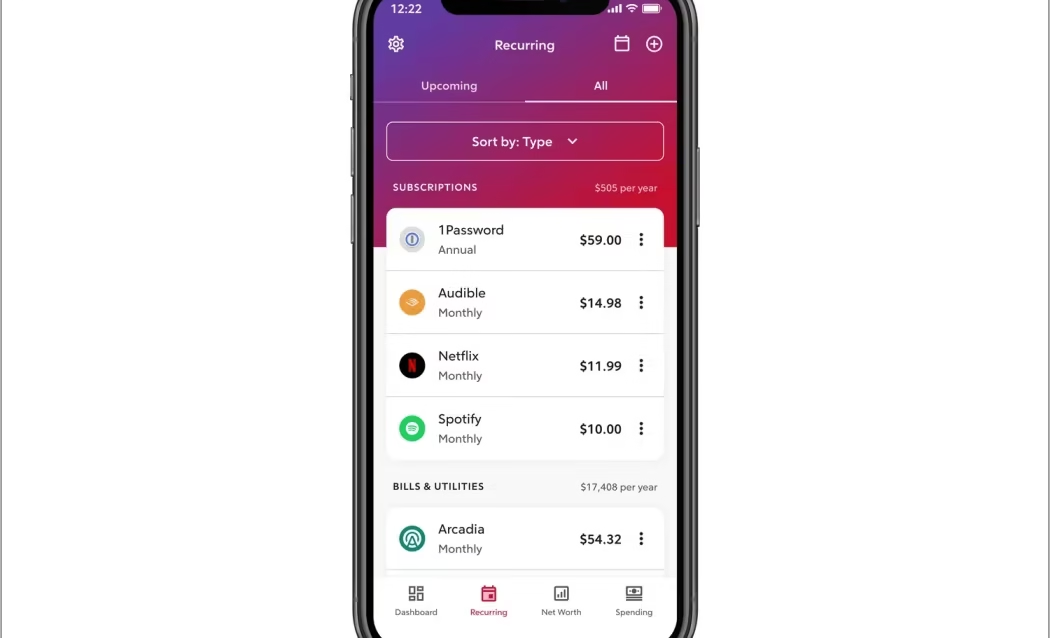
How to Track All Subscriptions
The fastest way to track all your subscriptions in 2026: audit four sources in sequence — your iPhone or Android app store, your bank and credit card statements, your email inbox, and PayPal or digital wallets. Doing all four in order takes about 30 minutes and catches charges that any single method misses. Then centralize your list in a tracker so you never rediscover the same forgotten charge twice.
Table of Contents
Most people guess they spend around $86 a month on subscriptions. According to a 2026 survey by Self Financial, the real average is $219 — a 2.5× perception gap that adds up to more than $1,500 in unaccounted spending per year. The same research found that 59.9% of respondents had at least one active paid subscription they hadn’t used in over 30 days, draining an average of $26.79 per month.
The problem is structural. Subscriptions are designed for frictionless payment — small charges on autopilot, spread across multiple payment sources, billed on rotating dates, and sometimes listed under the parent company’s name rather than the app you actually recognize. No single place shows you everything.
This guide walks you through every source, in the right order, with the exact steps that work in 2026 — including UI changes that make older how-to guides misleading.
Prerequisites
Before you start, have the following ready:
- Your iPhone (iOS 26 or later) or Android device
- Access to your bank’s online portal or app — logged in
- Access to your email inbox (the address you most commonly use to sign up for services)
- Your PayPal login, if you use it
- A place to record what you find: a notes app, a spreadsheet, or a dedicated tracker app
Estimated time to complete: 25–35 minutes for a first-time audit. Subsequent quarterly audits take 10–15 minutes once you have a running list.
Method 1: Check Your iPhone App Store Subscriptions (iOS 26)
Time: ~3 minutes
What it catches: Every subscription you pay for through Apple — App Store apps, iCloud+, Apple TV+, Apple Arcade, Apple Music, and any in-app subscription billed by Apple
2026 UI note: Older guides show a path through iTunes & App Store or Media & Purchases. Those paths are deprecated. The correct path in iOS 26 is through Settings → your Apple Account name → Subscriptions. Some guides published before 2025 still show the old nested path — ignore them.
Step 1. Open the Settings app (the grey gear icon).
Step 2. Tap your name at the very top of the Settings screen. This is your Apple Account profile.
Step 3. Tap Subscriptions from the list. If you do not see it immediately, scroll down slightly — it sits below iCloud and above Media & Purchases.
Screenshot description for team: Settings screen with user name tapped, showing the Apple Account page. Arrow pointing to the “Subscriptions” row, with the label showing a badge if there are active subscriptions.
Step 4. The Subscriptions screen shows two sections: Active and Expired (Inactive). Review each active subscription. For each one, note:
- App or service name
- Price and billing period
- Next renewal date
Step 5. Tap any subscription you do not recognize for full details, including the exact billing amount and the developer name.
Step 6. Also check your subscriptions via the App Store: open the App Store → tap your profile photo (top right) → tap Subscriptions. Both paths lead to the same list; use whichever is faster for you.
What Apple does NOT show here: Subscriptions you signed up for directly on a website — Netflix, Spotify, Adobe, Amazon Prime, and most SaaS tools that use their own billing systems. These are invisible to Apple. This is the number-one reason people undercount their subscriptions.
Method 2: Check Your Android / Google Play Subscriptions
Time: ~3 minutes
What it catches: Every subscription billed through Google Play, including Android apps, Google One, YouTube Premium, Google Workspace, and in-app purchases
2026 UI note: The Google Play subscriptions path has not changed significantly, but Google’s Payments Center now shows more detailed “Reason for Charge” metadata than in previous years — useful for identifying cryptic billing codes.
Step 1. Open the Google Play Store app.
Step 2. Tap your profile photo in the top-right corner.
Step 3. Tap Payments & subscriptions → Subscriptions.
Step 4. Review all listed subscriptions. Each entry shows the app name, price, billing date, and a Manage option.
Step 5. If you have multiple Google accounts, repeat this process for each one. Google subscriptions are tied to the account that purchased them, not the device. If you use both a personal and work Gmail, check both — a forgotten subscription is often sitting on a secondary account.
Step 6. To check non-Play Google services (Google One storage, Google Workspace), go to payments.google.com in a browser → Subscriptions & services → Manage subscriptions. This catches Google services that may not appear in the Play Store view.
Method 3: Audit Your Bank and Credit Card Statements
Time: ~10 minutes
What it catches: Everything the app stores miss — direct-billed subscriptions from Netflix, Spotify, Adobe, Amazon, gym memberships, SaaS tools, insurance, and any other service that takes payment directly
This is the most comprehensive method and the one most people skip. It catches charges that no app or platform consolidator can detect because the money is going straight from your account to the vendor.
Step 1. Log into your bank or credit card’s online portal or mobile app.
Step 2. Navigate to your transaction history. Set the date range to the last 90 days (three months catches quarterly and annual charges that a one-month view would miss).
Step 3. Scan for any charge that appears more than once at a regular interval. Flag recurring charges that appear monthly, quarterly, or annually. Many banks now automatically tag recurring charges — look for a “Recurring” or “Subscription” label in your transaction feed.
Step 4. For each recurring charge, record the merchant name, amount, and frequency. Some merchants bill under parent company names that do not match the service you recognize. Common examples in 2026:
| Statement descriptor | Actual service |
|---|---|
| APL*APPLE ARCADE | Apple Arcade |
| GOOG*YouTubePrem | YouTube Premium |
| NFLX | Netflix |
| AMZN PRIME | Amazon Prime |
| OPENAI | ChatGPT Plus |
| ADOBE SYSTEMS | Adobe Creative Cloud |
| MSFT*365 | Microsoft 365 |
| DSCVR+ | Discovery+ |
| PRMPS | Paramount+ |
| ZOOM.US | Zoom |
Step 5. If you have more than one credit or debit card, repeat for each card. Subscriptions tend to accumulate on whichever card you used when you signed up — and if that card changes, some services continue billing the old one or lapse silently.
Step 6. If you cannot identify a charge after searching the merchant name online, contact your bank and ask for the full merchant details. Under ROSCA (the Restore Online Shoppers’ Confidence Act, still in effect in 2026), subscription merchants are required to disclose the terms of recurring charges, and your bank can provide the full billing descriptor.
2026 regulatory note: The FTC’s Click-to-Cancel Rule was vacated by the Eighth Circuit in July 2025. However, the FTC continues active enforcement against deceptive subscription practices under ROSCA and Section 5 of the FTC Act. If you discover you were enrolled in a subscription without clear consent, you have recourse. See the FTC consumer reporting portal to file a complaint.
Method 4: Search Your Email Inbox
Time: ~5 minutes
What it catches: Annual subscriptions, trial confirmations, and any service you signed up for but never explicitly cancelled
Step 1. Open your primary email inbox. In the search bar, run each of the following searches, one at a time:
"your subscription""receipt for""invoice""payment confirmation""free trial""auto-renews""billing cycle""membership"
Step 2. Sort results by sender, not by date. This groups charges from the same service together and makes it easier to see whether you received a recent renewal email (meaning you are still being charged) versus only old emails (meaning the subscription may have lapsed).
Step 3. Pay particular attention to annual subscriptions — they charge once a year and are easy to forget entirely. An invoice from 11 months ago that you never cancelled is almost certainly still active.
Step 4. If you use multiple email addresses for sign-ups, run the same searches across all of them.
Method 5: Check PayPal and Digital Wallets
Time: ~3 minutes
What it catches: Any subscription authorized through PayPal, Apple Pay, or Google Pay that may not appear on your primary bank statement
Step 1. Log into paypal.com (or the PayPal app).
Step 2. Go to Settings (gear icon, top right) → Payments → Manage Automatic Payments.
Step 3. Review the full list of merchants who have active billing agreements with your PayPal account. Cancel any that you no longer want directly from this screen.
Step 4. For Apple Pay, note that Apple Pay itself does not maintain a subscription list — the underlying billing goes to your credit or debit card and shows in your bank statement. PayPal is the main digital wallet that maintains its own separate authorization list.
Step 6: Build Your Master Subscription List
Once you have audited all five sources, consolidate everything into a single list. According to Axis Intelligence’s analysis, the most useful subscription tracking format captures seven pieces of information for each entry:
| Field | Why it matters |
|---|---|
| Service name | Obvious, but also note the billing descriptor if different |
| Monthly cost (normalized) | Convert quarterly and annual charges to monthly equivalent for a true picture |
| Billing source | Which card, bank account, or PayPal |
| Billing date | So you can cancel before the next charge if needed |
| Last used | Honest assessment — weekly, monthly, never |
| Login email | The email account associated with this service |
| Cancellation path | Where to go to cancel: app store, website, or phone |
You can track this in a spreadsheet, a notes app, or a dedicated subscription tracker. For a structured spreadsheet template, Axis Intelligence’s approach: a Google Sheet with one row per service and the seven columns above, sorted by “Last used” — subscriptions you haven’t touched in 60+ days are immediately visible at the top when you sort ascending.
For users who want automatic detection without manual entry, apps like Rocket Money (connects to your bank via Plaid, free tier available), Bobby (iOS, manual entry, one-time purchase, privacy-first), or ReSubs (iOS/Android, no bank access required) can centralize tracking.
Common Errors and Fixes
“I see Subscriptions in Settings but the list is empty.” You are signed in with an Apple ID that has no active App Store subscriptions. This can happen if you use multiple Apple IDs. Sign out and sign back in with the Apple ID you use most for app purchases. To check which ID purchased a specific app, open the App Store → tap your profile photo → tap your Apple ID name at the top — this shows the currently active account.
“A subscription I cancelled still shows in my list.” Cancellation in the app store stops the next renewal — it does not end your current billing period. A cancelled subscription remains visible as “Active” until the period you already paid for expires. This is expected behavior, not a billing error.
“I see a charge on my bank statement I cannot identify.” Before assuming fraud, search the exact merchant descriptor text in Google. Most unrecognized charges are legitimate subscriptions billed under a parent company name. If the Google search returns nothing useful, contact your bank and request the full merchant details — they are required to provide them. Only escalate to a dispute if the merchant cannot be identified after both steps.
“Netflix/Spotify does not appear in my Apple Subscriptions screen.” Correct — it won’t. If you signed up directly on Netflix’s or Spotify’s website (not through the App Store), those services bill your credit card directly. They do not appear in Apple’s system. Find them in your bank statement instead.
“I can see my subscriptions in Google Play but can’t cancel from there.” Some subscriptions purchased through the Play Store lock cancellation to the merchant’s website after the trial period ends. If the Cancel button is greyed out, tap Manage → the screen should direct you to the service’s own cancellation flow. If it doesn’t, go directly to the service’s website and cancel from your account settings there.
“I deleted the app — doesn’t that cancel the subscription?” No. Deleting an app from your device does not cancel the associated subscription. The subscription continues billing until you explicitly cancel it through the app store or the service’s website. This is one of the most expensive misunderstandings in consumer software.
“My bank doesn’t show a ‘Recurring’ tag on transactions.” Not all banks tag recurring charges automatically. If yours doesn’t, the manual scan is the only option — look for identical amounts appearing at regular intervals. Alternatively, export your transactions as a CSV and filter in a spreadsheet by amount to find recurring patterns.
When This Won’t Work
If a subscription is tied to an email address you no longer access. If you used a throwaway email or an old work address to sign up for a service, neither the email search nor the app store audit will surface it. The bank statement is the only reliable method — the charge will still hit the payment card regardless of what email was used.
If you share billing with someone else. Family Sharing plans, shared credit cards, and joint bank accounts mix charges in ways that make it hard to attribute subscriptions to one person. The email search becomes essential in this case — look for receipts addressed to you specifically.
If your payment card changed but the subscription continued. Some services have “account updater” agreements with card networks, meaning your card issuer automatically forwards your new card number when you get a replacement. This means a subscription from three years ago could still be active on a card you think of as a fresh account. Check the full transaction history, not just recent months.
If a subscription uses a virtual or privacy card number. Services like Privacy.com or Apple’s hide-my-email feature obscure the connection between a subscription and your real identity. You will need to log into your virtual card service to see the full list of merchants authorized to charge that card number.
If you are looking for data breaches connected to your subscription email. Tracking what you are subscribed to does not tell you whether a service has been compromised. For that, use a have-i-been-pwned check alongside your audit — every email you use for subscriptions is also a potential breach surface.
What to Do Next
Once you have your master list, the most effective next actions — in order of impact:
Cancel anything you haven’t used in 60 days. The research is consistent: if you haven’t opened a service in two months, you are unlikely to start. The loss-aversion of “I might use it later” costs the average person $384 per year, according to Self Financial’s 2026 data.
Consolidate duplicate services. Check for overlap — paying for both Spotify and Apple Music, or both Dropbox and iCloud+ at a storage tier that covers the same need. Keep one, cancel the other.
Move subscriptions to a single card. Using one dedicated card for subscriptions makes future audits take minutes instead of hours. It also prevents subscriptions from going silent when a different card expires.
Set calendar reminders for annual renewals 14 days before they hit. Annual subscriptions are responsible for a disproportionate share of forgotten charges because they appear only once a year.
Run this audit quarterly. A 10–15 minute check every three months prevents the list from growing beyond manageable size. The Self Financial survey found 70% of respondents had forgotten to cancel a free trial at least once — quarterly audits catch those before they compound.
For ongoing credential management and to protect the email accounts connected to your subscriptions, our best password managers guide covers the tools that make secure, unique passwords per service practical. For users concerned about the security of the bank-linked subscription apps (Rocket Money, etc.), our cybersecurity statistics hub has the current data on financial app breaches and credential exposure.
FAQ
How long does a full subscription audit take?
For a first-time audit following all five methods in this guide, expect 25–35 minutes. If you have multiple bank accounts, credit cards, and email addresses, allow 45 minutes. Subsequent quarterly audits take 10–15 minutes once you have a master list to update rather than build from scratch.
Will checking my Apple subscriptions cancel anything?
No. Viewing your subscriptions in Settings → [your name] → Subscriptions is read-only until you tap a specific subscription and explicitly choose to cancel. Just opening the page has no effect on your billing.
What’s the difference between “cancelling” and “unsubscribing”?
In practice, the same thing. In app stores, “cancel” means you stop the next renewal but keep access through the current billing period. Some third-party services use “unsubscribe” to mean the same thing, while others use it to mean removing yourself from marketing emails without affecting billing. When in doubt, look for confirmation that your next renewal date has been removed from your account.
Can I track subscriptions without giving any app access to my bank?
Yes. Bobby (iOS, one-time purchase) and ReSubs (iOS/Android) let you log subscriptions manually with no bank or email connection. SenticMoney is another option that stores data locally with no cloud sync required. These apps require more upfront effort but offer the strongest privacy posture. See our best budgeting apps guide for a side-by-side comparison.
Does deleting an app cancel the subscription?
No. This is the most common and costly misconception. Deleting an app removes it from your device but has no effect on the subscription billing. You must cancel through the App Store (for Apple-billed subscriptions), Google Play (for Google-billed), or directly through the service’s website for direct-billed subscriptions.
I found a charge I don’t recognize — is it fraud?
Not necessarily. Most unrecognized charges are legitimate subscriptions billed under a parent company name. Search the exact merchant text from your statement in Google first. If that doesn’t resolve it, contact your bank for the full merchant details. Escalate to a dispute only if the charge cannot be traced to any service you authorized.
What happened to the FTC’s Click-to-Cancel rule?
The FTC’s 2024 Negative Option Rule update — which required subscriptions to be as easy to cancel as they were to sign up for — was vacated by the Eighth Circuit Court of Appeals in July 2025. It is no longer enforceable as written. However, the FTC continues enforcement against deceptive subscription practices under existing law (ROSCA and Section 5 of the FTC Act). If a service makes cancellation deliberately unreasonable, you can file a complaint at reportfraud.ftc.gov.
How do I cancel a subscription that won’t let me cancel online?
If the cancellation UI is broken, absent, or deliberately obstructive: (1) contact customer support via chat or email and request cancellation in writing; (2) dispute the next charge with your bank as “subscription not cancellable” — many banks will block further charges from that merchant; (3) file an FTC complaint via reportfraud.ftc.gov. Under ROSCA, companies are legally required to provide a simple cancellation mechanism.